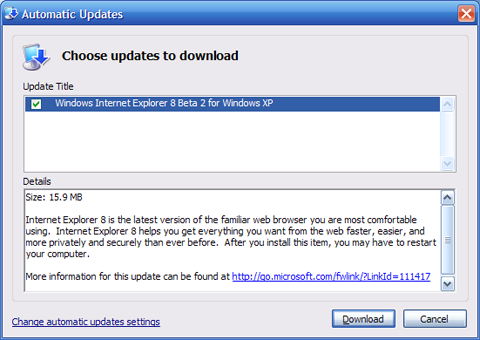
It has been a year and a half since IE7 was released but I was still surprised to see Internet Explorer 8 was getting ready to make its debut. Microsoft has put a lot into making IE the number one browser although they haven’t been able to monetize this advantage by sending more folks to Microsoft properties as planned.
They may have noticed that Firefox is starting to get a bigger share of the market. It could also be that Microsoft is trying to fend off concerns of the European Commission. Either way, IE8 beta is available now. I don’t recommend it but if you’re experienced enough you can try IE8 out by visiting the
Microsoft IE8 Readiness Toolkit site.
The most important new feature you’ll want to know about is the “Emulate IE7”. I quickly found many sites failed to work in the default IE8 mode including most Blogspot sites like Bits from Bill. Luckily, many of the new features will continue to work in Emulation mode.
The other good news is when a particular site fails, it won’t kill the browser, just that particular tab process. The browser will try to recover but unfortunately, if it fails once, it will continue to fail.
Let me repeat again, unless you need to write a review or you’re a serious web developers, don’t rush to download IE8 Beta. While I haven’t had serious problems, I’ve read a number of horror stories that are typical with beta software. Chances are some of these people never bothered to read the release notes to see if they had compatible machines. For me it’s been impossible to use IE8 in anything but Emulate IE7 mode. Some bugs are minor like having a Yahoo icon being displayed on my sites. Others cause the browser to hang and can’t be duplicated.
Browser Chrome
Microsoft has always been an advocate for cool new names for things and they’ve put in a lot of creativity into this new version. My favorite is a new name for toolbars. A toolbar is now just a part of your “browser chrome”.
WebSlices
This feature isn’t a bad idea but has limited applicability. It will be good if you spend a lot of time with your browser open and you’re interested in watching a portion of a website that might change regularly. Basically, it’s like adding a favorite to your “chrome” that displays only a portion of the web page you’re interested in. Essentially it’s a new way to do what used to be called Channels and takes up space on your browser chrome. Unless you’re a stock watcher or Ebay professional you might want to find a better use for this space.
On the web side, WebSlices are easy to add. If anything the web based code of this feature would be great for mobile devices. I could definitely see accessing webslices from my phone.
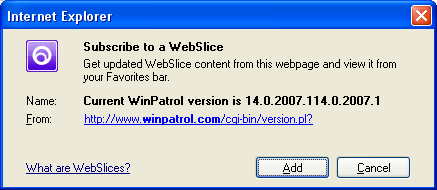
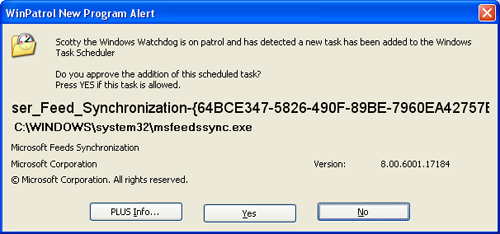
You may find that just adding a slice will cause a new program to be added to your Scheduled Tasks. MSFeedSync says it’s used to update out-of-date system feeds. Oddly, while WinPatrol reports this new job, it doesn’t appear in my Control Panels Scheduled Task applet on my XP test machine.
Activities
This seems to be a new name for copy and paste. Well, in fairness this combines the features of copy, paste with SendTo. Most of the examples I’ve seen have already been available by just using JavaScript.
According to Microsoft:
“Activity providers enhance your ability to work with text that you select on a webpage, enabling you to map addresses, define words, and more.”
For a list of currently supported Activities check out
http://ie.microsoft.com/activities/en-en/Default.aspx
Developer Tools
While I may be a little critical of IE8 they have added many features I love. The new developer tool is very useful to anyone developing websites, especially folks like myself who still hand code most of our sites. This is something I’ve had on Firefox, thanks to a plug-in, but it’s very important to have this feature on IE.
JavaScript
I’m very pleased that Microsoft has continued to make improvements in their JavaScript engine. There’s even a new JavaScript debugger available. YAY!! I really love how Microsoft insists on calling it “JScript”. It’s reasonable because JavaScript has no connection to Java, but I can’t help thinking Microsoft just thinks Java is a dirty word.
Open Standards
Microsoft claims that IE8 will “interpret web content in the most standards compliant way it can”. This will be the default mode that IE8 uses. One might think this is a ploy to pacify regulators but IE General Manager Dean Hachamovitch denies this in the IE Blog.
“While we do not believe any current legal requirements would dictate which rendering mode a browser must use, this step clearly removes this question as a potential legal and regulatory issue.”
Translation: There was nothing wrong before, but we fixed it anyway so shut up.
Address BarSome good common sense improvements have been made to where you enter your web address or URL. IE8 will now handle URL’s that might have been fragmented. This solves a problem that happens when you try to copy and paste long URLs that may have been Emailed to you. This seems like a no-brainer but I can’t help thinking there could be security concerns. You’ll also see the a colored background in the address bar to help identify real and potentially dangerous sites. In addition, you'll see the actual domain will be a little bolder so users can see who they're really connected to.

Favorites Bar
One more name change came to the Links toolbar. It’s now called the “Favorites bar”. The area above the web page now takes up five rows counting my Google toolbar and unlike older versions of IE it can not be customized. I guess I should be happy they haven’t added an Office 2007 style ribbon.
For those brave souls who are trying IE8, I look forward to hearing your feedback.
Labels: Beta, IE8, Toolbar, Webslice
 Bits from Bill