Bits from Bill

Technology thoughts leaking from the brain of "Bill Pytlovany"

Monday, October 06, 2014

Your Email Password is a Target

pier
Interested in hacking into the Email account of Charlie Sheen, Rob Lowe, Sean Penn or Carson Daly?  You’ll want to know they attended Santa Monica High School. Want access to the CEO of a large retail corporation?  Keep reading.


 highschool
Simple question used by Yahoo to verify your identity.

Truth is we’re all screwed but having good password habits will keep out the amateurs. It may save you from emailing people on your contact list to say, “I’ve been hacked, if you received email from me don’t click on the link.”
My security expert friends will advise you to use…

1) Strong Passwords
2) Unique passwords for each of your password protected websites
3) Two-step verification

Important Advice to Share From BillP
My most important tip to family and friends is “Use fake information when asked for answers to security questions.”


Example of Fake Security Answer
Example of making up your own unique answers to security questions.

I had plenty of time this summer to research malware and identify the first step in the infection process.  The most common way to get hacked is someone using the small amount of public information needed too reset your email password. Once they have one of your email addresses it’s not hard to receive a new password on other services.
I recommend creating easy to remember jokes to use when asked for answers to security questions.  Some examples may be “What high school did you attend?” Pick something like Jefferson High School (Happy Days) or Rydell High(Grease). I won’t tell you what it is but people often laugh out loud when they see what I use for my mothers maiden name. Yes, some company’s still use it.
maidenname

Target’s Easy Target

Using real data is dangerous. In less than 15 minutes I was able to find information about “former” Target CEO Gregg Steinhafel. His mother’s maiden name was Schreindl. He graduated from Homestead High School.
His first job was at Steinhafel's Furniture and he attends Wayzata Community Church. Born in Milwaukee, Steinhafel graduated from Carroll University in 1977 and earned an MBA from Northwestern University two years later. I could say more but for the safety of his wife and three children I’ll stop here.
When a high school kid gained access to Sarah Palin’s email he wasn’t a computer genius. He just looked up the answers to the security questions used by Yahoo. Even though that was way back in 2008 this method has continued to grow as the number one way to steal personal data.

yahoovalidate

I’ve also noticed a set of quizzes common on Facebook specifically designed to collect personal data used in security questions.  I am currently investigating the background of the companies who spread these quizzes. Most created their domain within the last 30 days. I will share any information in the future.


Some Security Advice May Be Outdated
Complicated passwords:

Some may recommend a complicated password like “hfY4df$dhEW_!cvrh3H7D&d.” It’s safer than 123456 but isn’t very easy to remember. A complicated password may be useful to beat programs which try every possible combination but most systems will lock you out after a handful of incorrect attempts.

Unique passwords:
Using different passwords on different services is good advice but unless you’re using a program that remembers your passwords it’s too easy to forget unique passwords. If you’re like me you’ll just end up resetting your password using security questions.

Two-Step Verification
The two step verification process is a step in the right direction For banking or any service where real harm could be done it’s worth the extra step. If someone gains access to your cell phone or one of your email accounts the benefit is lost. Unfortunately, you’re trusting that the company is not going to take advantage of having more of your personal data like your cell phone number or alternate email address.

Some Advice Will Never Change
As far as recent failures by Home Depot, Lowes and other large companies the advice hasn’t changed much in 20 years. When your bill comes, check all your charges and make sure they’re legitimate. Most likely you can access your credit card online and see charges as they come in. If you haven’t already, register an account connected to your credit card and review charges regularly.
Reviewing your bills doesn’t just apply to credit or bank cards. Keep an eye on any charges like your cable or phone bill. Legitimate companies have been known to add bogus charges. Verizon wireless added a monthly charge for ring tones on Cindi’s phone. They claimed she agreed to the monthly charge by not responding to a text message. They removed the charge when I explained her cell phone at the time didn’t support test messaging.

Labels: , , , , ,

Share on Facebook


Sunday, January 25, 2009

What's New in Windows 7 Security

One of the main reasons Vista evangelists encourage others to upgrade is security. Unfortunately, many have scoffed at User Account Control for being too heavy handed. Vista 64 users found that many Anti-Virus programs didn’t work. Vista doesn’t solve the most common reason for infections which remains user error. Windows 7 still doesn’t solve the problem of user’s being tricked but it does come with some serious improvements.


Bitlocker is Finally Useful
Bitlocker has been available in the more expensive versions of Vista but was never a tool I would have recommended.  Bitlocker encrypts your entire disk drive so you need a private key or password to access anything on the disk. While this may sound desirable, it increases the possibility of hard drive errors. It reminds me too much of when Microsoft added full disk compression to Windows to increase disk space. It was a great idea that led to more data loss then it saved.


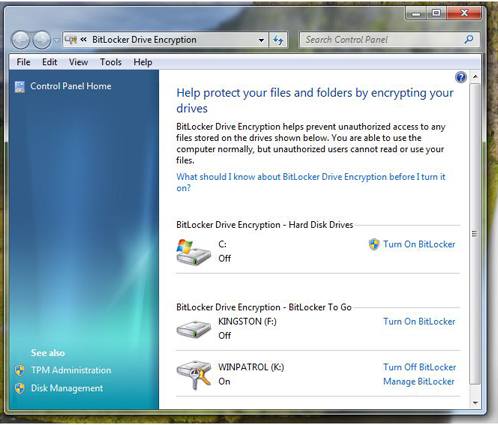
Enter “Bitlocker To Go”. Bitlocker can now be applied to portable storage devices like USB flash drives. This is one of my favorite new features in Windows 7. The use of portable devices to store data has become very common.  It also means misplacing data in public areas happens far to often. You know darn well people working for banks and credit card companies are bringing their work home on thumb drives. Bitlocker To Go makes it less dangerous to all of us.

New Bitlocker in Windows 7 showing flash drives.
Bitlocker now shows and encrypts portable storage media


 User Account Control Options

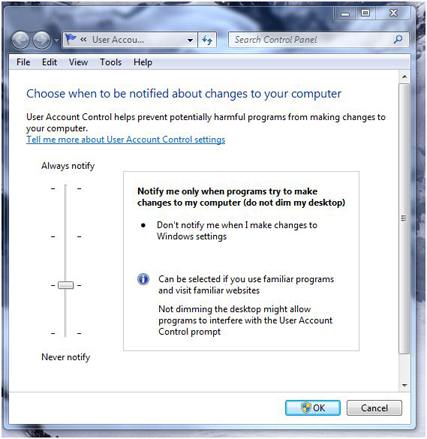
The User Account Control feature now has some options.  You can turn if off completely or choose two middle settings. One of the options removes the annoying black screen that secures the desktop and lets you know the UAC dialog is coming.  I wish this was an option by itself . To disable the black screen on Windows 7 you’ll also need to agree to remove UAC when “I make changes to Windows settings”.  I’m still looking into what Microsoft considers “Windows settings”. Vista users can click here for instructions on how to remove the black UAC screen.

What would really be nice is to come up with a scheme that would keep UAC active but like many firewalls, allow you to mark particular programs or functions as permitted.

New UAC Dialog
New User Account Control options dialog


Smart Cards
Expect to see an increase in the use of Smart Cards in Windows 7.  Smart Card drivers were first introduced in Windows XP SP2 and enhanced in Vista but certification testing and installation wasn’t a simple process.  Windows 7 automatically detects which drivers are needed without any user intervention. Do you have a hard time keeping track of passwords? A smart card may be in your future.

I also expect to see applications using smart cards to combat software piracy. In the 70’s some software was released with little “dongles” that needed to be plugged in for the software to work. The dongles in the old days were easy to get around. Smart cards will require some serious and costly efforts to break when used to prevent illegal software distribution.

What I’d love to see is the ability to use a smart card in combination with User Access Control to give permissions to commonly used programs.


Local Security Policy
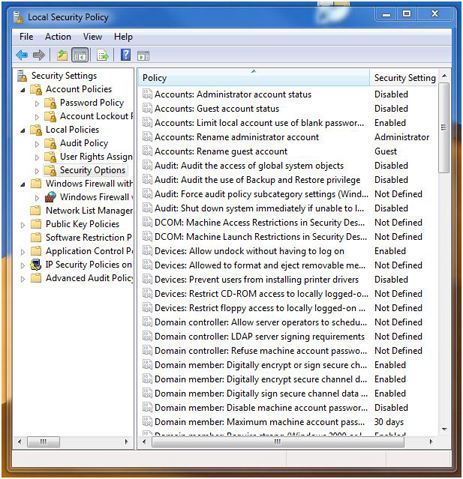
Windows 7 has plenty of security settings available if you’re helping someone else set up their computer. Unfortunately, additional security settings may not be obvious. One applet in need of help is the one used to set Local Security Policy settings. This is a very powerful tool that could really be easier to use. IT managers need to be familiar with this applet. If you’re configuring a home machine for family members knowing more about Security Policy settings is a real plus.  Just like RegEdit, this tool can really get you into trouble if you don’t know what you’re doing.  And like RegEdit, it should receive a major UI overhaul.

Local Policy Settings
Local Security Policy


Action Center

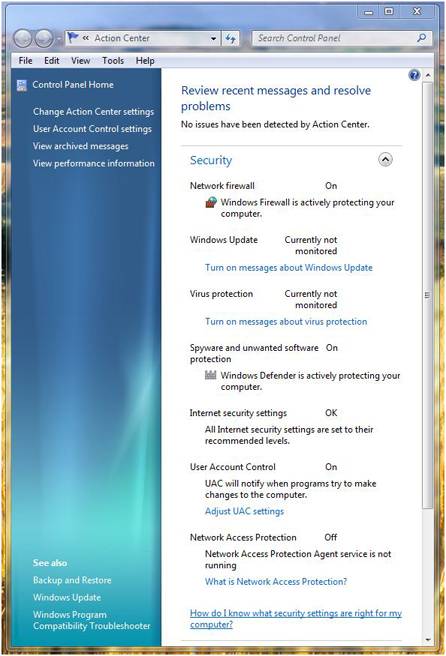
If you’re looking for a friendly interface for security settings you’ll want the “Action Center”.  This single, simple applet gives you access to many of the settings you’ll want to review when using Windows.

Windows 7 Action Center


Conclusion
Microsoft has obviously been listening to users and they know security is a huge problem. I’m sure they’d be happier if they could reduce the calls from infected users. Windows 7 addresses security as much as time and testing has allowed.  Personally, I would have liked to see more improvements in firewall and networking monitoring but they have to leave some functionality to 3rd party solutions.


Most of the security improvements in Windows 7 will never be noticed by users. Improvements in code to prevent buffer overflows, and other vulnerabilities has been a major focus in Redmond. We all hope, Tuesday Security Patch Days will be something we can someday reminisce about.


Labels: , , ,

Share on Facebook


Monday, May 05, 2008

Not All Video Games are Evil

One of the big news topics last week was the release of Grand Theft Auto IV. Immediately came the condemnation of the video game industry from parent groups and others with their own conservative agenda. While games like Grand Theft Auto get all the attention you may be surprised to know there are video games designed to change the world in a positive manner.


My friends at Breakaway Games know a thing or two about simulations and take the topic very serious. Best known for their battle simulations Breakaway entertains and provokes thought without gangsters and prostitutes. I’ve listed some titles you might take a look at.


Pulse!
Playing doctor will never be the same once you have a look at “Pulse!”. Developed jointly with Texas A & M the future of medical education is featured by this virtual simulation of clinical health care training.


A Force More Powerful
If you’d like to see yourself as Ghandi or Martin Luther King this simulation game might be for you. Your job is to oust a repressive dictator by creating a campaign of non-violent resistance.


Incident Commander
If you’d like a job with Homeland Security this simulation game is for you. You’ll face hostage situations, bomb scares, chemical spills and other potentially real life disasters. Incident Commander is distributed free to municipalities by the Dept. of Justice.


Incident Commander


Code Orange
If the hospital environment suites you, Code Orange Emergency Medical Management Training for Mass Catastrophe might thrill you. Can you handle mass casualties from a weapon of mass destruction as they flood your ER?


Disclaimer: My friend Doug Whatley at Breakaway Games and my other real gamer friends will tell you I’m not a gamer. My attention span reaches its limit with simulations like the old Activision title “Little Computer People”.


Labels: , ,

Share on Facebook