Bits from Bill

Technology thoughts leaking from the brain of "Bill Pytlovany"

Monday, October 06, 2014

Your Email Password is a Target

pier
Interested in hacking into the Email account of Charlie Sheen, Rob Lowe, Sean Penn or Carson Daly?  You’ll want to know they attended Santa Monica High School. Want access to the CEO of a large retail corporation?  Keep reading.


 highschool
Simple question used by Yahoo to verify your identity.

Truth is we’re all screwed but having good password habits will keep out the amateurs. It may save you from emailing people on your contact list to say, “I’ve been hacked, if you received email from me don’t click on the link.”
My security expert friends will advise you to use…

1) Strong Passwords
2) Unique passwords for each of your password protected websites
3) Two-step verification

Important Advice to Share From BillP
My most important tip to family and friends is “Use fake information when asked for answers to security questions.”


Example of Fake Security Answer
Example of making up your own unique answers to security questions.

I had plenty of time this summer to research malware and identify the first step in the infection process.  The most common way to get hacked is someone using the small amount of public information needed too reset your email password. Once they have one of your email addresses it’s not hard to receive a new password on other services.
I recommend creating easy to remember jokes to use when asked for answers to security questions.  Some examples may be “What high school did you attend?” Pick something like Jefferson High School (Happy Days) or Rydell High(Grease). I won’t tell you what it is but people often laugh out loud when they see what I use for my mothers maiden name. Yes, some company’s still use it.
maidenname

Target’s Easy Target

Using real data is dangerous. In less than 15 minutes I was able to find information about “former” Target CEO Gregg Steinhafel. His mother’s maiden name was Schreindl. He graduated from Homestead High School.
His first job was at Steinhafel's Furniture and he attends Wayzata Community Church. Born in Milwaukee, Steinhafel graduated from Carroll University in 1977 and earned an MBA from Northwestern University two years later. I could say more but for the safety of his wife and three children I’ll stop here.
When a high school kid gained access to Sarah Palin’s email he wasn’t a computer genius. He just looked up the answers to the security questions used by Yahoo. Even though that was way back in 2008 this method has continued to grow as the number one way to steal personal data.

yahoovalidate

I’ve also noticed a set of quizzes common on Facebook specifically designed to collect personal data used in security questions.  I am currently investigating the background of the companies who spread these quizzes. Most created their domain within the last 30 days. I will share any information in the future.


Some Security Advice May Be Outdated
Complicated passwords:

Some may recommend a complicated password like “hfY4df$dhEW_!cvrh3H7D&d.” It’s safer than 123456 but isn’t very easy to remember. A complicated password may be useful to beat programs which try every possible combination but most systems will lock you out after a handful of incorrect attempts.

Unique passwords:
Using different passwords on different services is good advice but unless you’re using a program that remembers your passwords it’s too easy to forget unique passwords. If you’re like me you’ll just end up resetting your password using security questions.

Two-Step Verification
The two step verification process is a step in the right direction For banking or any service where real harm could be done it’s worth the extra step. If someone gains access to your cell phone or one of your email accounts the benefit is lost. Unfortunately, you’re trusting that the company is not going to take advantage of having more of your personal data like your cell phone number or alternate email address.

Some Advice Will Never Change
As far as recent failures by Home Depot, Lowes and other large companies the advice hasn’t changed much in 20 years. When your bill comes, check all your charges and make sure they’re legitimate. Most likely you can access your credit card online and see charges as they come in. If you haven’t already, register an account connected to your credit card and review charges regularly.
Reviewing your bills doesn’t just apply to credit or bank cards. Keep an eye on any charges like your cable or phone bill. Legitimate companies have been known to add bogus charges. Verizon wireless added a monthly charge for ring tones on Cindi’s phone. They claimed she agreed to the monthly charge by not responding to a text message. They removed the charge when I explained her cell phone at the time didn’t support test messaging.

Labels: , , , , ,

Share on Facebook


Monday, July 20, 2009

We Have Your Password, and We Own You!

Every few months I like to write about passwords and backups just to remind everyone how important these issues can be. While I’d like to remind you again to review your backup policies, I really want to stress some common sense password protection.

I’m sure you all know enough not to use your kids or pets names for passwords but do you use different passwords for every different site you visit online? If not, you could be in real danger and you’re putting everyone else in danger too. STOP IT!


Last week an employee of Twitter had their account compromised and internal business documents were stolen. The documents were actually offered for sale on the internet. The Twitter server wasn’t “hacked”, it was accessed using the employees name and password. Seems the employee used the same password on another online site.


Someone Call Security

“First, it's important to note how these documents were stolen. In this case, a Twitter employee used the same non-unique password on multiple services. A hacker gained access to our business documents because this common password was retrievable on an unrelated system. If you've ever used the same password on more than one service, you've made the same mistake that lead to this theft”

Any time you sign up and provide a password, that information may be easily available to the owners and employees of that site. If you use the same password for an online forum as you do with PayPal you’re in danger. If you use the same password for multiple social networks you leave yourself open to a different kind of identity theft. Some one can impersonate you and spread malware to your friends and family.


Giving Away Your Password

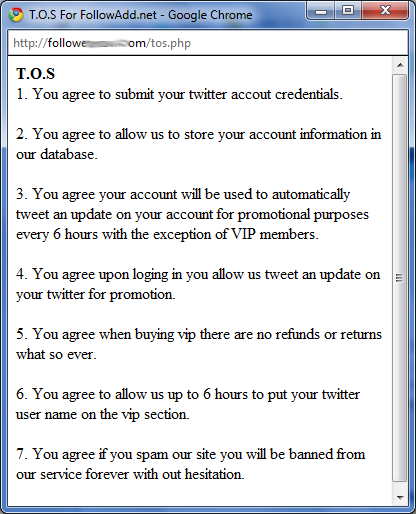
There’s also the danger of freely giving away your Email and password that plenty are falling for. A number of sites offer to get you new followers on Twitter. The only conditio is they now own your account and can use it to broadcast advertisements. Unfortunately, too many people don’t read the conditions which typically look like the following…


Free Follower Scam conditions


Obviously a lot of folks slip pass this notice and are surprised when advertisements appear in front of their name. You might also notice they don’t say anything about not selling your Email address to the spam companies.


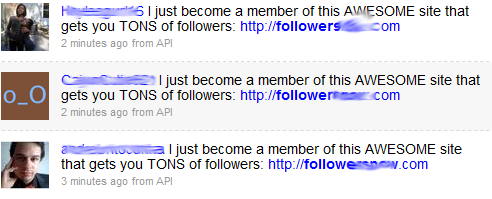
Every minuate hundreds fall for this scam.
I’m not sure how many followers make up a ton.


If you’ve fallen for these scams you’re not alone. You will want to create a brand new password. While you’re at it, create some more new passwords for other sites as well.


Labels: ,

Share on Facebook


Friday, November 07, 2008

Passwords Up for Grabs on Social Networks

I’m not a big fan of new Web 2.0 Social networks but I have participated in some new ventures. You won’t find me on MySpace, BeBo or other silly services. I am active on LinkedIn which is geared towards professionals and yes, I’m addicted to Twitter. I did join Facebook to write about their Beacon privacy problems and still participate now and then to see what my friends are doing.  I don’t participate in any of the Facebook applications because like many services they always try to trick me into sending invites to my friends.


The services I really hate are the ones who try to get you to hand over your address book so they can spam your contacts with invites to join. In many cases, they just want you to give them access to your Email accounts so they can suck out your contacts and automatically populate your new friends list.  While this might be convenient it can be very dangerous. 


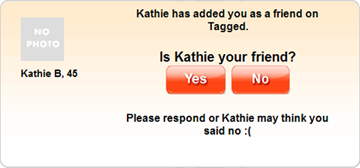
The most annoying is a service called Tagged.
You've been tagged


It Gets Worse


Many sites will transmit your name and passwords as unsecured data. This makes your name and password visible to anyone along the Internet path.


When you’re entering or giving someone else access to your name and password you should first look to see if you’re on a page that is https:// or shows the locked symbol indicating a secure transmission of data.  There’s also a method which can be used encrypt data called OAuth but it’s impossible to know which sites actually support this. 


Recently, I joined BrightKite which allows me to integrate messages to Twitter. They tell me Twitter doesn’t support “OAuth” which means I sent my Twitter login information across the net unsecured. This is scary because there are a wide variety of tools which integrate with Twitter. None of them will encrypt your name/password when logging on to Twitter. So if you see me say something really stupid on Twitter, it might not be me.  Smile


I’m sure you don’t use the same password for different online sites ( cough cough) but in the case of social networks, it’s very important you create different passwords. Just like I periodically remind readers to review their backup procedures, and today is a good day to look at your current password scheme.


Labels: , , ,

Share on Facebook