Bits from Bill

Technology thoughts leaking from the brain of "Bill Pytlovany"

Monday, July 27, 2009

Bill's Bit Readers Club Recommendation

Just about to be released, a couple of fun books that I’ve been looking forward to. They’re now available for pre-order on Amazon.


"The World According to Twitter" is by emmy-nominated David Pogue. "Windows 7 Secrets" comes from Paul Thurrott and Rafael Rivera. I've had the honor of following each of the authors as they worked hard on their latest compilation and shared their experience with other friends on Twitter.

Pre-Order now and Save!


Full Disclosure: While I certainly support the authors, my affiliation with Amazon gets like 10–15 cents if you order either book via the links above.

Labels: , , ,

Share on Facebook


Friday, May 08, 2009

MiFi Portable Wifi will be My Next New Toy

How would you like a WiFi connection anywhere you go?


Last December I put together a list of predictions for 2009. One of the things I wrote about was the increase in using 3G type cell networks instead of WiFi Networks when traveling.

3G Networks When Traveling
I have discovered when I travel Wi-Fi coverage can be spotty. Hotels boast high speed Wi-Fi connections but they aren’t doing a very good job. Even at a recent Microsoft conference I ended up using my Verizon EV-DO connection because it was faster than the Wi-Fi provided. Currently the best reason to use 3G over WiFi is security. Keep your WiFi networking at home and use 3G when you travel.

After traveling again earlier this year, I’m even more convinced you can’t depend on public hotspots and found my Verizon USB modem more dependable. It could be I always request rooms in quiet locations away from the elevator but the WiFi has consistently been poor.

Today Verizon announced my next new toy. The MiFi 2200 Intelligent Mobile Hotspot will be available on May 17th and will be in my hands soon after. A creation of Novatel, the MiFi 2200 is a portable WiFi HotSpot that weighs only 2.05 ounces and will fit in your shirt pocket.  It uses the Verizon 3G broadband mobile network.


Verizon MiFi
Verizon MiFi 2200

According to the published specs, the MiFi has a battery life of 4 hours and includes a USB connection which will provide additional power on the road. Up to 5 WiFi devices can use the MiFi for an internet connection.

From Verizon’s Press Release
The MiFi 2200 will be available online and in Verizon Wireless Communications Stores for $99.99 after a $50 mail-in rebate with a new two-year customer agreement. Customers can select from various price plans:

  • $39.99 monthly access for 250 MB monthly allowance and 10 cents per megabyte overage
  • $59.99 monthly access for 5 GB monthly allowance and 5 cents per megabyte overage

Customers can also use the MiFi 2200 with Verizon Wireless’ Mobile Broadband DayPass for $15 for 24-hour access when the device is purchased at full retail price without a monthly service plan.


I first learned about the MiFi from David Pogue who wrote more about the MiFi for the NY Times. He says a 1 hour TV show on iTunes is 200 megabytes  which calculates to 25 shows a month if you’re on the 5 GB plan.  I agree 5 GB a month is plenty of bandwidth for me.


So why am I so excited? I already pay $60 a month for a USB modem that only works on a single laptop.

As I’ve mentioned before, I’m happier when I use Verizon 3G network when traveling. Recently, I shocked fellow travelers at Dulles Airport when I connected to my home Slingbox and watched a show I had previously recorded on my TiVo. The video quality was great which you might not expect for a cell network.  If I’m traveling with others, theyll be able to use my MiFi hotspot at no extra charge.

I love using my Apple iTouch.  Unfortunately, once I leave my home WiFi network I can’t connect to many online services like Facebook or Twitter. Now with MiFi in my pocket my iTouch will have all the benefits I would want in an iPhone but I can keep the 32 GB of  memory available in the iTouch.

Verizon also claims that MiFi will be for cameras. I do have an EyeFi SD card in my camera but I’m not counting on a connection right out of the box.  Once I get my own MiFi, I’ll let you know how it really works.


Labels: , , ,

Share on Facebook


Tuesday, December 18, 2007

OLPC Evaluation Guide - First Impressions

I’ve been getting a lot of questions about my new OLPC so I expect to write a lot about my experience with this new XO Laptop. I doubt I’ll be the only one writing about this unique device.


OLPC Evaluation Guide


Rule 1: Forget everything you already know.
The target user for this laptop are kids who have never been exposed to a computer before. You’ll need to look at using this computer as if you’ve never used Windows, Mac or even a C64 before.
That means forget about double clicking by tapping on the touch pad. The position of OK and Cancel buttons won’t match the Windows interface. You shouldn’t expect File/Edit drop down menus. Instead of Save, you’ll “Keep” your data and access it from your journal. Forget any concept of a folder based file system.


Rule 2: Forget about the price
In theory, the kids won’t ever know the market value of the OLPC laptop. It was supposed to be the $100 laptop but that price will have to wait. If you Give One to Get One, you are making a donation. Don’t expect your OLPC laptop to be anything more than a conversation piece or toy.


Rules 3: Take your Time
I had thought I could spend a couple days to evaluate the OLPC. I was really wrong. I keep learning more and more and there’s no way I can do justice to this machine until I spend at least a month with it. Nobody should publish any review for this laptop until at least next year.


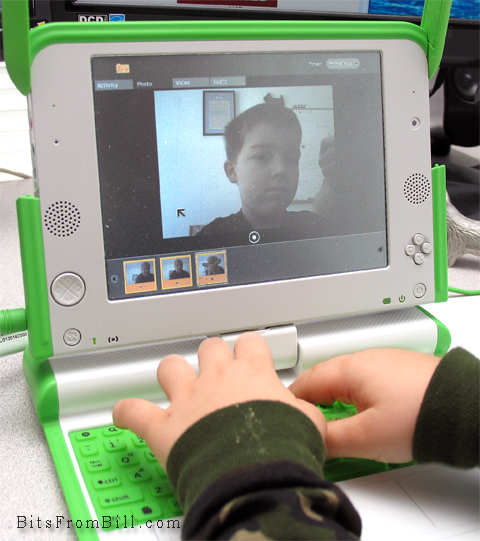
Tristan taking his photo with the OLPC
Tristan playing with the photo/video/audio application.


OLPC First Impression


My first impression was disappointment but that’s already starting to change. The interface is different which is ok and expected. Unfortunately, it’s fragmented. It tries to be different but still tries to teach computer skills. I think there’s always been a gap between academia and real world. What sounds good in some white paper may not convert well to a real product(::cough:: Ada). Profit is sometimes the best motivation in the creation of great products.


Earlier this month John C. Dvorak wrote an article suggesting it might be better to just give $200 worth of food. John was just being a cranky greek and I still disagree. Giving this laptop is an investment and while risky it’s worth a shot. It’s not like it could hurt America’s image any more than the Bush Admistration has already done.


What I Like

  • The browser doesn’t suck: It’s quick enough and while limited, it supports Flash, Javascript, PDF files and Cookies(Yea that can be a good thing)

  • Applications are plentiful: It even includes a number of programming examples for kids to learn how to create their own programs.

  • Size: It’s small for kids hands.

  • Networking: It took a little practice but it now always finds my WiFi network and searches for any available Mesh networks.

What I don’t Like

  • No power crank: I thought this was the whole point.

  • Durability: I expected it to be a little more ruggedized.

  • Bugs: I’ve had my share of reboots and mouse weirdness. I can’t say if it’s hard,soft or firmware related.

  • No Popups: Some web apps actually use pop ups.

  • Sound quality: The quality is similiar to my old C64 but the speaker isn’t as good. Seems like MOS Technology’s SID chip could gotten cheaply.

One thing for sure, there is a huge need for some instruction books along with tips and tricks. I have to wonder if David Pogue is already working on “OLPC: The Missing Manual”.

Update: I spoke with David and we won't be seeing a book from him but Edward Cherlin directed me to OLPC help available at http://wiki.laptop.org/go/OLPC_Publications. Edward also was kind enough to address my dislikes in the comments section below.

Labels: , , , ,

Share on Facebook


Friday, June 29, 2007

When Will I Get My iPhone?

I know you’re all saturated with iPhone buzz and most of you don’t really care but being an early adopter type, everyone seems to be asking me when I’ll be getting my iPhone.

The answer is probably never. Personally, I don’t have need for an iPhone. The only reason for me to get one is to look cool, and that’s not an issue. If I did plan on getting an iPhone it wouldn’t be today. Most likely the only reason I’d pick up an iPhone is to create some kind of protection software. It won’t be long before someone finds the first iPhone security flaw. I did check and sure enough someone has parked the domain name of iPatrol.com. Smile and the whole world smiles with you

There’s more iPhone news online than anyone can handle but my favorite is still a video from my friend David Pogue. He’s a funny guy and while he’s been accused of being a little too Apple friendly, he’s quick to point out the biggest iPhone flaw.

Click here for Pogue Video

Labels: ,

Share on Facebook