Bits from Bill

Technology thoughts leaking from the brain of "Bill Pytlovany"

Monday, November 09, 2009

Verizon Droid Day One; First Impressions

I’ve tried them all and I’m still not sure how we classify the new Motorola Droid. We’ve called them plenty of names; SmartPhone, Personal Digital Assitant, Pocket-PC, AppPhone but there isn’t a generic term yet for a iPhone Wannabe Device(IWD).

Of all the hand-held digital devices, I’m pretty excited about the Droid. I’ve been an iTouch user for over a year but it’s not a phone. I’ve used a Verizon MiFi for internet access so I can use the apps which are actually more valuable to me than a phone. I refused to switch to an iPhone because AT&T 3G service in our area stinks. The Droid may finally provide almost everything I needed in a single hand-held device.

If you’re looking for a full review of the Droid this isn’t one of them. There are hundreds of them online that review specs and typical review topics. This is as the title says Day One and I’ll tell you what I like along with all stupid things I still haven’t figured out. Watch for Day Two through Four and more as I explore more this week and learn how to unleash the full potential of the Droid.


Physical Keyboard Day One
Not all Droids have the physical keyboard which is a little confusing. I have the Motorola Droid but Verizon is also selling the HTC Droid Eris which only has a virtual keyboard and uses an older version of the Android operating system.

I thought one of the things I’d really love is having a physical slide out keyboard. So far (it’s only day one) I still like using the virtual keyboard. When I did use the physical keyboard weird screens would pop up because I may have been hitting shortcut keys. Keep in mind I’ve been using an iTouch and I don’t have any experience using a Blackberry type device. As far as virtual keyboard goes I like it even better than my iTouch. The Droid has a much better predictive dictionary so I don’t have to touch as many characters.

Applications Day One
Apple make have a million applications but just so many you really need. It took me a little while before I realized I needed to open the “Market” icon if I wanted the App Store. For me, the first apps I downloaded were Facebook and a Twitter client called “Twitwalk”. Facebook is barely usable and doesn’t come close to the one of the iPhone. Twitwalk is pretty plain but usable. I picked TwitWalk because it has the most stars but there are many others. I’ll write about other applications as I learn more.

The weirdest thing I’ve experienced is on the top of the screen. It appears that I’m running multiple copies of applications. I remember someone on Twitter saying they had to download a program to close apps but I suspect this is user error. There is a Manage Applications selection under Settings but it doesn’t seem to list what I’m seeing on the top bar.


Camera Day One
I’ve read good and bad things about the camera. It’s very easy to use and below was my first successful posting of a photo from my Droid to Facebook. My first attempt was to use the “Take a Photo” button on the Facebook application. This resulted in what looked like a thumbnail in my Mobile Uploads library. What I finally did was go into the Droid “Gallery”, find the photo and then share it with Facebook to get a reasonable size.

droid1

Stay Tuned for more photo and video tests later this week.

Phone Day One
Making my first call was simple and as easy like it should be. The call quality was exceptional. When I received my first phone call it almost didn’t happen. I tried to touch the green phone on the screen but didn’t know I actually had to slide it to the right to answer.

One cool thing that worked on Day One without any effort was importing friends into my Contact list from Facebook. This was a surprise and was kind of cool when I saw my wife’s Facebook profile photo appear on my phone when she called.


GPS Day One
As far as a phone goes the GPS is brilliant but still needs a little work to compete with stand alone devices. I took one short trip around town using the GPS along side my Garmin Nuvi but it probably isn’t a fair comparison. It didn’t help that the Droid kept calling my street “Sunni-side” Road and not Sunnyside. I’m going to need a little more time to fully evaluate this feature.
droid1

Tomorrow I’ll be spending some time in a hospital waiting room so I should have plenty of time to explore more. Stay Tuned for My Droid Day Two.


Day Two; In Search of Apps

Day Three; Copying my Music

Day Four; We have a Map for That


Labels: ,

Share on Facebook


Saturday, November 15, 2008

Start Your Holiday Shopping Now

It's never too early to start your holiday shopping and this year I have some recommendations I promise will be popular with your loved ones.

Bakugan Starter Pack 

My recommendation for kids is Bakugan, Bakugan, Bakugan.
They will be the hottest item under tree this year and you better purchase now. I predict you’ll have a hard time finding these in December.
Bakugan Battle Arena


We’re already a Bakugan family and have already had problems finding new Series 2 packs.


For the adults, I recommend a digital photo frame.  We received one last year and love it.  Ours came from a company I had never heard of before called SmartParts but it turned out to be one of the best I’ve seen.  My biggest surprise is that ten year old photos I took with my first low-res Casio QV-PC 0.23 megapixel camera look great on our digital photo frame.


Smartparts 10.4 inch Digital Picture Frame


Mario Kart for Nintendo Wii

I’m not a real gamer but I’ve had a blast with this one. We have grand kids in Germany and every Saturday we connect to the Internet, play Mario Kart and race against the kids in real-time. It would be perfect if they could also integrate it with Wii Speak but for now our unlimited Germany plan with Vonage allows us all to chat on speaker phone while we play.


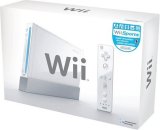
And for the entire expanded family, get your Nintendo Wii now while they last. Nintendo claims they’ve increased production so there will be plenty on the shelves but I recommend if you plan on a Wii Christmas, order now.


Nintendo Wii


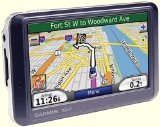
My last personal recommendation saved my butt when I went out to LA for the Microsoft Professional Developers Conference. I don’t regularly drive on highways with over 6 lanes so I was happy to have this available.

Garmin Nuvi 760

Labels: , , ,

Share on Facebook


Monday, June 16, 2008

Review of my new Garmin Nuvi 760

Best Purchase I made all year.
If you’ve been shopping for a GPS units you’ll know how tough a decision it can be.  While I don’t do a lot of driving I picked up a Garmin Nuvi 760 mainly for my wife to use. I love having a GPS in the car but nothing is perfect and like many units the Nuvi just took a little education.

Click to shop for Garmin Nuvi 760
 Now $249.99 (Half of what I paid last summer)


While most reviewers tell you to forget the options I went all out with the MP3 player, Bluetooth and even FM traffic/weather. It was more expensive but I really wanted to get something that provided hands free cell phone use and I’m very happy I did. Having a SD card slot was also a must.


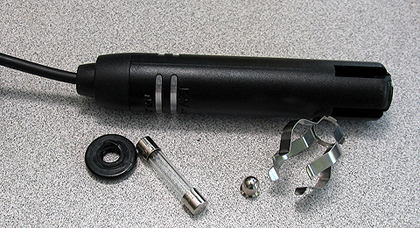
First the bad news. My unit came with a specific car charger which is required for the real-time traffic service. It was a pure piece of crap that required assembly although no instructions were included. Even after I figured it out, it wouldn’t stay together so I’ve ordered a real car charger and will pass on the real-time traffic service.


Garbage car charger that came with my Garmin Nuvi
FM Receiver Car Charger


Update: Garmin support didn’t understand why it was in pieces until we realized black piece above was broken and they sent me a new one immediately. I was very impressed with their tech support (Joshua K) who even took the time to make a video with his cell phone on how to put it together.  Needless to say I’m very happy with this level of support.

Update: (11/2008) My daughter had a problem with her 11 month old Garmin unit. She contacted customer support and they replaced it, no muss, no fuss.

At first Battery life was also a disappointment.  Garmin’s online chart claims up to 5 hours but my battery warning comes up after two hours of just sitting on my desk. The kind folks at Garmin did have a simple explanation.  I should turn off Bluetooth and reduce the screen brightness which I admit was set much higher than the default. I had the screen up to 80%.  By turning it down to a still very visible 30% my battery now exceeds 5 hours even with Bluetooth enabled.


I’ve read a number of reviews from folks complaining about the accuracy of GPS units. I’ve discovered this can happen with the Nuvi as well but only when it first boots up.  The Nuvi remembers the last location you were at and until it finds enough satellites, it can have you driving through a field. The directions for driving around my small upstate village has a few issues but nothing that couldn’t be fixed with a map update.


Points of Interest work very well on the Garmin.  You can input where to go with very few touches. I love that the list of points in any category are automatically sorted by distance. The information was really good although they did include a restaurant that burned down 8 years ago.


The hands free Bluetooth was one of the reasons I chose the Nuvi 760 and I’m impressed. Once you pair up your cell phone it’s automatically detected and you’ll see a phone icon on the screen.  This is essential if I expect my wife to use it. Points of interest are automatically included as an address book for the phone so making calls is easier than any phone I’ve had. I’m actually considering using the Nuvi as my phone interface inside my house as well.


Ultimately, I’m very happy with the 760. (Thanks Steve) The screen is extremely easy to read and interface requires minimal touch. Even if I already know my way, having the arrival time feature is a great plus. Thanks to friends on Twitter I’ve also found a great site to compare GPS units. If you’d like more info on any unit check out http://www.gpsreview.net/

Top Ten Reasons to Try WinPatrol Again


Labels: ,

Share on Facebook


Friday, December 28, 2007

Favorite New Christmas Toys

Christmas day at the Pytlovany house was very special and included no less than 25 family members of all ages. There were new babies, new clothes and naturally new toys.


Alexis, Emily and Michal


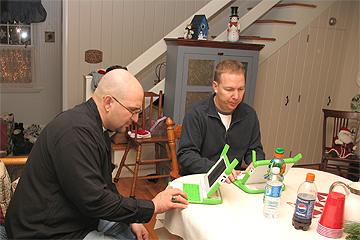
Except for my new XO laptop, nobody I know received a new computer or laptop this Christmas. I take that as a bad sign for the computer industry. It used to be that new versions of Windows generated new computer sales but there hasn’t been a lot of excitement around Vista.


John and Jim playing tetris
John and Jim exploring the new XO laptop.


Our big present this year was SmartParts 15” Digital Picture Frame. I have used and reviewed other digital picture frames and wasn’t expecting to be this impressed. I love it and even though it’s from a company I had never heard of. I’m happy to say the picture quality is awesome. The interface is easy and while I’m not sure I’ll use the feature, it will play audio and video files from what ever flash media you use.


The Nintendo DS Lite was still popular but the big kids were really excited about the Sony PSP. We already have a Wii which I have written about before. GPS Units were very popular with the adults. I really want one myself so I’m anxious to hear back which one works the best.


Santa gave one of my other favorites to my granddaughter Marisa. She’s been spending a lot of time playing with her new iTouch. I might get one when they expand the memory. She also received a lot of iTune gift cards which must be used in the country they were purchased. We’ll be doing a lot of downloading before she returns to Germany next week.


Click on “Comments” below and share information on your favorite new toy.

Labels: , , , ,

Share on Facebook


Monday, December 03, 2007

Two "Must Have" Camera Features

Over many years the focus of digital camera improvements have been price, pixels and speed. It’s all the same technology, just bigger, better and cheaper. The popularity of the digital camera has however spawned a welcome industry evolution in solid state memory cards.

I’ve been snapping digital photos for over ten years and finally, I’m starting to see some real innovations.

  • Wireless Photo Transfer
    This is a natural progression and Eye-Fi just made it simple and cheap. Instead of each camera company building it into their camera, Eye-Fi has built it into the memory card. Eye-Fi even supports automatic upload to 20 photo sharing sites with more to come. For only $99, if your camera uses SD cards you’ll want to order one of these before supplies run out.

Wireless SD Card
Eye-Fi Wireless SD Card


  • Global Positioning Tagging
    It may not be available for all cameras but if Sirf has its way it will be soon. Your camera currently records the date and time you take your photo. How nice would it be to know exactly where you were when the photo was taken? In my opinion this isn’t any kind of brilliant idea, it’s a natural convergence of technology. The GPS network is there and available, why shouldn’t your camera use it.

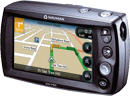
Navman 750
Navman 750

What would really be really cool is if they could just build GPS functionality into the Eye-Fi card. Smile, it's sooo sweet!


Labels: , , ,

Share on Facebook