Bits from Bill

Technology thoughts leaking from the brain of "Bill Pytlovany"

Saturday, November 01, 2008

WinPatrol Exposes New Windows 7 Services

I was pleased that my 1st install of Windows 7 went well. Keep in mind everything below is related to the current alpha build of Windows 7.  The final release is more than a year away

I’m thrilled to report that WinPatrol works great and plays well with Windows 7.  In fact, immediately after the install Scotty notified me that someone was trying to reset my Auto-Update settings.  This is one of the unique settings that WinPatrol monitors and apparently Microsoft thinks everyone should be auto-updating.
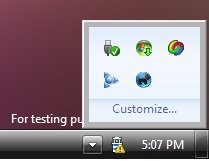
Windows 7 System Tray

Microsoft has listened and made it easier to manage the icons in the system tray or what should be called the “Notification Area”. The down icon is used to open and close the system tray program icons. The yellow ! shield provides you have notifications so they won’t continue to slide up and annoy you.  The blank spot on the far right is now the click region that provides the “Show Desktop” action.
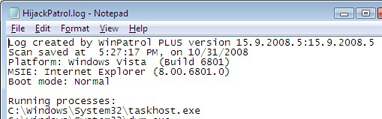
WinPatrol Hijack log
Start of WinPatrol HiJackPatrol Log for Windows 7 Alpha

Again, keep in mind this version is over a year from completion so it still shows up as Vista. I also found that TaskHost.exe was a new integral part of the newest Windows.


Windows 7 Services
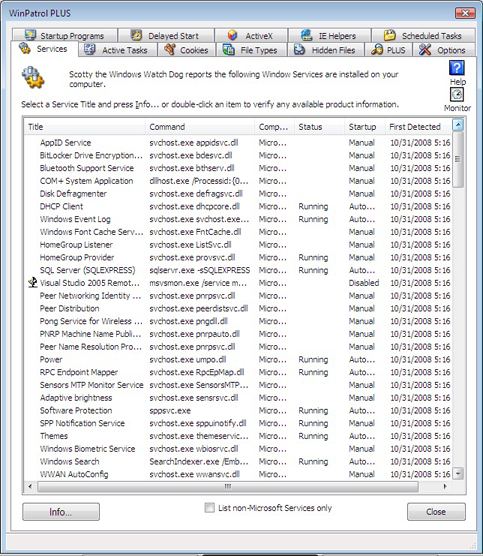
New Services that showed up with Windows 7

One of the other unique features of WinPatrol that folks don’t realize is the ability to sort programs by the date they were first detected on your system. Using WinPatrol it was easy for me to see the list of new Services that are Windows 7 specific.  WinPatrol will also tell you which ones are running and if they’re automatically loaded.

The following are the interesting new filenames. Highlighted ones seem to be running at all times, at least on my machine.

AppID Service appidsvc.dll
BitLocker Drive Encryption Service bdesvc.dll
Bluetooth Support Service bthserv.dll
Disk Defragmenter defragsvc.dll
DHCP Client dhcpcore.dll
Windows Font Cache Service FntCache.dll
HomeGroup Listener ListSvc.dll
HomeGroup Provider provsvc.dll
Peer Networking Identity Manager pnrpsvc.dll
Peer Distribution peerdistsvc.dll
Pong Service for Wireless USB pngdll.dll
PNRP Machine Name Publication Service pnrpauto.dll
Peer Name Resolution Protocol pnrpsvc.dll
Power umpo.dll
RPC Endpoint Mapper RpcEpMap.dll
Sensors MTP Monitor Service SensorsMTPMonitor.dll
Adaptive brightness sensrsvc.dll
Software Protection sppsvc.exe
SPP Notification Service sppuinotify.dll
Themes themeservice.dll
Windows Biometric Service wbiosrvc.dll
WWAN AutoConfig wwansvc.dll

There were many features that Microsoft showed at the Professional Developers Conference that don’t exist in this alpha build. I’ll be looking forward to future releases and will continue to let you all know what I find under the hood.


Labels: , ,

Share on Facebook


Sunday, March 09, 2008

Faster Computing by Disabling Services

Disabling normal Startup/AutoRun Programs can really speed up your system. Picking and choosing some programs that aren’t needed to run all the time is a straight forward decision. Versions of Windows based on NT technology like XP and Vista include programs called “Windows Services”. These programs may also be set to run on bootup or automatically when other programs launch. Deciding what Services can be disabled or set to manual may not always be obvious.

Many of the services from Microsoft are integral parts of the Windows operating system. Some services that may not sound needed could be required by other Microsoft services. Some Services that don’t seem necessary today could be expected by new software or hardware components that you add in the future.

Bill Detwiler at Tech Republic has created a list of common Windows Services and included recommendations for which services can be disabled. The six page white paper also includes suggested settings along with special considerations. If you really like the minimum programs running on your system check it out by clicking here. (update: Registration is required)


WinPatrol Services
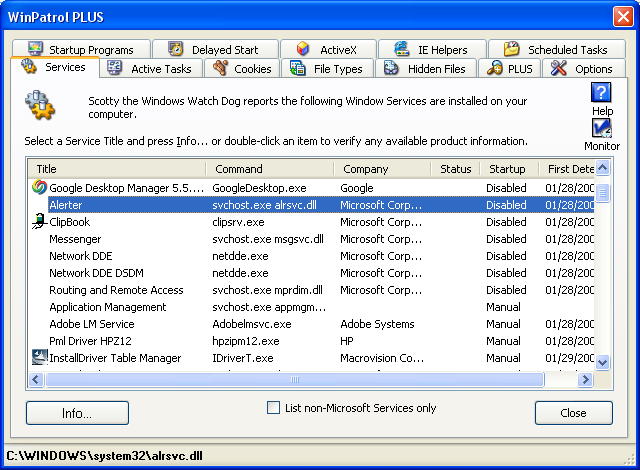
Services Tab using WinPatrol

When I first added the Services tab to WinPatrol there were very few non-Microsoft service components. Now, many new programs include one or more Services. You’ll find many of the autoupdate programs these days are Services. The options for services are Automatic, Manual and Disable. When I’m not sure if something can be Disabled, I’ll set it to manual so it’s still available when needed but won’t run on boot up.

Update 03/16: Some comments have been left with tips on other sites that provide information on Windows Services.

Black Viper: http://www.blackviper.com/WinXP/servicecfg.htm

Speedy Vista: http://www.speedyvista.com/services.html


Labels: , , ,

Share on Facebook


Tuesday, November 27, 2007

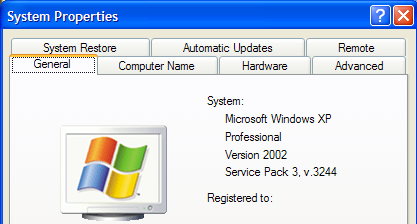
Windows XP SP3 Includes Four New Services

Microsoft is in the process of testing service packs for both Vista(SP1) and Windows XP(SP3). There has been a lot of talk about how Windows XP may be the biggest competitor for Vista. I’ll never forget Bill Gates showing the Blue Screen of Death on Windows 98 as the reason to upgrade to Windows XP. Many of us are satisfied with what Windows XP offers and I’m pleased with the continued support from Microsoft.

While reports of Vista’s service pack have been mixed, many folks testing Windows XP SP3 report a more robust operating system. While I don’t typically upgrade immediately, as a developer I need to keep up with new versions of Windows. I wasn’t included on Microsofts’ beta list but I was able to check out SP3 on a friends laptop.

Windows XP SP3


You won’t find a lot of visible changes to SP3. In fact, I was very surprised that it didn’t force an to upgrade to IE7.

Using WinPatrol’s date “First Detected” feature, I did find a few new services that weren’t there before. This list could vary depending on your configuration.

  • EAPSVC.DLL – Provides windows clients Extensible Authentication Protocol Service Click for more info

  • KMSVC.DLL – Manages health certificates and keys (used by NAP) This relates to managing keys for volume licenses and their health, not medical information.

  • QAGENTRT.DLL – Allows windows clients to participate in Network Access Protection. This includes some of the new security features of Vista minus UAC.

  • DOT3SVC.DLL – This service performs IEEE 802.1X authentication on Ethernet interfaces. Improves detection and connection to wireless networks

Luckily, I was able to run some benchmarks on the system before SP3 was installed. I’ll write more if I find a difference in performance or other issues as I continue to perform tests.

Labels: , , ,

Share on Facebook


Wednesday, August 22, 2007

Let's Talk About Startup Applets and Services

The only thing I hate more than programs that auto-update without permission are programs that automatically start without getting your ok. One of our new friends, Larry Osterman wrote a multiple part series describing his thoughts on the topic. As a Windows programmer for Microsoft Larry has some real insight on how and why startup applets and many services exist.

If you’re interested, especially if you’re a programmer, the links to each topic are below. You’ll also want to read the comments and replies to comments on each topic.

1) It's my computer, dagnabbit, not yours!


“Applets come in lots of sizes and shapes - they can be services waiting on an app to use them; they can be processes that handle systray icons; they can be helper applications. But they share one common: they all consume resources, sometimes LOTs of resources. And I would rather that these applets NOT consume resources.”

2) Why do people write applets?


“Generally, applets seem to fall into several rough categories:
Updaters
Notification Area Handlers
Helper applications
Services


3) So why are applets so bad, anyway?


“Updaters often to run all the time, even though they're only actually doing work once a day (or once a month). That means that they consume resources all the time that they're active.”

4) Applet Mitigations


“Think about how to reduce the applets impact on the user. Reduce the DLL load in your applet whenever possible - each DLL you load consumes a minimum of 4 private pages (16K on x86) and takes between 500K and 1M cycles to load.”

5) Applet Mitigations – Updaters


“…use the task scheduler functionality built into Windows to schedule your updater. The task scheduler is a remarkably flexible mechanism for scheduling periodic operations. “

6) Applet Mitigations – Notification Area Handlers


“…some notification area handlers are quite well thought out and provide easy access to useful information or commonly accessed functionality (the volume, clock, taskmgr, "safely remove hardware" and RSS Bandit are ones come to mind). Some have questionable value (the network and outlook handlers come to mind), some just don't seem to make sense at all (Quicktime and handlers like the various display driver and printer control panel notification area handlers)”


7) Applet Mitigations - Services
"...seriously consider how much time you spend in your service's start routine. The less time the better (especially if you're an auto-start service). The less work you can do before reporting that your service has started to the service controller, the faster the system will boot. "

Labels: , , , ,

Share on Facebook