Bits from Bill

Technology thoughts leaking from the brain of "Bill Pytlovany"

Monday, July 14, 2008

What is AppleSyncNotifier?

When the iPhone was first released a new file suddenly appeared to everyone who used iTunes. It was called “Apple Mobile Device Service”. You really didn’t need it unless you had an iPhone or an iTouch iPod but that didn’t stop Apple from including it as an Service for all iTunes users.


Now that the iPhone 2.0 is available iTunes is adding a new “MobileMe” file called Apple Sync Notifier. The number one request for PLUS Information from WinPatrol users starting on July 10th has been for AppleSyncNotifier.exe with the title MobleMe.

We’ve added the following tips to the WinPatrol PLUS database.

Applesyncnotifier.exe will be found in your c:\Program Files\Common Files\Apple\Mobile Device Support\bin\ folder. This file installs with iTunes and is used when syncing your iPhone, iTouch, iPod, etc.

There may be problems installing Apple Mobile Device Support with iTunes 7.7 under Windows Vista. Error messages in 'AppleMobileDeviceHelper' when trying to sync your phone could result.

Several possible solutions are discussed at
http://discussions.apple.com/thread.jspa?messageID=7576275. We will update WinPatrol PLUS information as it becomes available.

I now realize how Apple plans to sell more Macs. They keep adding more autostart crapware to anyone using iTunes so Windows continues to slow down and look bad. Apple has already been criticized for trying to sneak their Safari browser download into any new iTunes updates. (Yes, they make it an option but when the option is checked by default, I consider it sneaky). They do the same thing with QuickTime.


Anytime you view a QuickTime movie Apple puts a Quicktime Task helper back in your list of Startup programs. WinPatrol users can mark QTTask.exe as “Disabled” and Scotty will automatically remove it from your Startup list anytime it’s added. Just like the iTunesHelper startup program, you can run it manually when needed instead of it running all the time.

You’ll also find iTunes 7.7 adds an updated service called “Bonjour” or nDNSResponder.exe which is set to run automatically. Apple says the following about the Bonjour Service…

“Enables hardware devices and software services to automatically configure themselves on the network and advertise their presence, so that users can discover and use those services without any unnecessary manual setup or administration.”


Top Ten Reasons to Try WinPatrol Again


Labels: , , , , ,

Share on Facebook


Wednesday, August 22, 2007

Let's Talk About Startup Applets and Services

The only thing I hate more than programs that auto-update without permission are programs that automatically start without getting your ok. One of our new friends, Larry Osterman wrote a multiple part series describing his thoughts on the topic. As a Windows programmer for Microsoft Larry has some real insight on how and why startup applets and many services exist.

If you’re interested, especially if you’re a programmer, the links to each topic are below. You’ll also want to read the comments and replies to comments on each topic.

1) It's my computer, dagnabbit, not yours!


“Applets come in lots of sizes and shapes - they can be services waiting on an app to use them; they can be processes that handle systray icons; they can be helper applications. But they share one common: they all consume resources, sometimes LOTs of resources. And I would rather that these applets NOT consume resources.”

2) Why do people write applets?


“Generally, applets seem to fall into several rough categories:
Updaters
Notification Area Handlers
Helper applications
Services


3) So why are applets so bad, anyway?


“Updaters often to run all the time, even though they're only actually doing work once a day (or once a month). That means that they consume resources all the time that they're active.”

4) Applet Mitigations


“Think about how to reduce the applets impact on the user. Reduce the DLL load in your applet whenever possible - each DLL you load consumes a minimum of 4 private pages (16K on x86) and takes between 500K and 1M cycles to load.”

5) Applet Mitigations – Updaters


“…use the task scheduler functionality built into Windows to schedule your updater. The task scheduler is a remarkably flexible mechanism for scheduling periodic operations. “

6) Applet Mitigations – Notification Area Handlers


“…some notification area handlers are quite well thought out and provide easy access to useful information or commonly accessed functionality (the volume, clock, taskmgr, "safely remove hardware" and RSS Bandit are ones come to mind). Some have questionable value (the network and outlook handlers come to mind), some just don't seem to make sense at all (Quicktime and handlers like the various display driver and printer control panel notification area handlers)”


7) Applet Mitigations - Services
"...seriously consider how much time you spend in your service's start routine. The less time the better (especially if you're an auto-start service). The less work you can do before reporting that your service has started to the service controller, the faster the system will boot. "

Labels: , , , ,

Share on Facebook


Saturday, May 05, 2007

Auto Update Programs Running All the Time

One of the bonus features for WinPatrol PLUS users is they can quickly look up information on new programs that appear on their computers. Our PLUS knowledge base contains information on both malware and legitimate programs and is written so hopefully mere mortals can understand what a program is doing. Essentially, the “PLUS Info…” feature is a “What the heck is this program?” feature.

At least once a month I compile a list of the most commonly requested programs along with some free info on many of the more dangerous programs. I couldn’t help but notice that last month 4 of the top 15 are designed to just sit there and check for new versions.

The following popular programs were among the most often requested information by WinPatrol users. I’ve included some snippets of information along with links to PLUS Info examples.

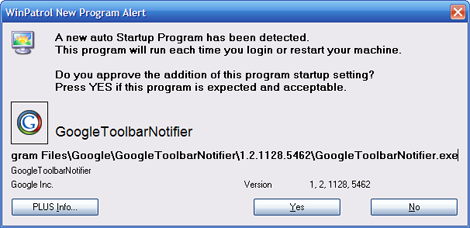
GOOGLETOOLBARNOTIFIER.EXE
“Googletoolbarnotifier.exe and swg.dll install with recent versions of the Google Toolbar. According to Google, these files run in the background and prevent other search engines from setting themselves as the default search engine.”… More PLUS Info…


GETFLASH.EXE
“Getflash.exe is the update utility that installs with Adobe's popular Flash player. Adobe now owns Flash as they've purchased the entire Macromedia Product line.” More PLUS Info…


SPUPDSVC.EXE
Spupdsvc.exe will appear in your Windows\System or System32 folder. It's the Windows Service Pack Installer update service also described as the Update RunOnce Service. As the name implies, this file should not need to be running all the time.". More PLUS Info…

ISUSPM.EXE
“InstallShield is a very popular program installer. Chances are good that you have lots of programs on your system that used that as the program installer. Isuspm.exe can be used to check for updates or additional product information.” More PLUS Info…


sample of a winpatrol alert when google toolbar notifier is detected
Most Common Alert April 2007


Obviously, this indicates to me that most people have no idea these resident programs are being added to automatically run. If you don’t use WinPatrol, you might want to run MSConfig which comes with Windows and take a peek at your list of Startup Programs.

Labels: , , ,

Share on Facebook


Monday, April 30, 2007

Top Ten Blogs April 2007

I’m ending the month with a list of the most popular posts. This is mainly to aid people who get here by searching for topics included in this months archive web page.

So, here’s the top ten for April in no particular order…

  1. File Restoration, a new Revenue for Microsoft

  2. Multiple Languages for WinPatrol

  3. Not All Computers are Updated Equally

  4. Female Journalists in the Media

  5. Connection Not a Vista of Dell Problem

  6. Dell Offers Windows XP As Choice

  7. Apple Ad Could Improve New Windows PC’s

  8. Microsoft Patches & BlackBerry Updates

  9. Do I Need a Registry Cleaner?

  10. AntiSpyware Advertising Gets Nasty

Labels: , , , , ,

Share on Facebook


Wednesday, April 25, 2007

Do I Need a Registry Cleaner?

After some comments I made recently, I’ve had a few folks ask me why I have a problem with Registry Cleaner programs. While there are some very good, professionally done Reg Cleaners, this is just not the type of program I run on my own systems.

Based on my own experience, I haven’t been able to find a real benefit in performance based on removing useless items from the registry. For me, it’s strictly a matter of risk versus gain. While I’m sure most Reg cleaners do exactly what they’re suppose to, the risk of problems due to errors or user misunderstanding are too great.

There’s a myth that humans only use 10% of their brain. If this was true(it’s not), would you want someone cutting out part of the brain you don’t use in hopes it would make the other part work better? The registry is the brain of the Windows operating system. The risk of removing something that is critical is greater than the benefits that may be gained.

I’ve found there are two ways which really make a difference in Windows performance.
One is more memory. When recommending new computers, I usually suggest available funds be put towards extra memory rather than a faster processor.

The second is getting rid of the additional programs that run at Startup. While you may think me biased, I don’t think I’m alone on this one. I’ve been reading a lot of articles recently about crapware or craplets being installed on new computers.

Most tech heads agree on these two, but there’s still some debate about Registry Cleaning and Disk Defragging.

I took a look at some of the claims from Registry Cleaners and they all say pretty much the same thing.
“Problems with the Windows Registry are a common cause of Windows crashes and error messages.”

“By fixing these obsolete information in Windows registry, your system will run faster and error free.”

“By using a registry cleaner regularly and fixing registry errors your system should not only be more stable but it will also help improve your system performance without expensive hardware upgrades.”

I don’t think it’s worth the risk. What do you think?

Labels: , , , ,

Share on Facebook


Sunday, April 15, 2007

Apple Ad Could Improve New Windows PC's

In their latest Ad campaign Apple Computer has finally pointed out one of the biggest flaw in new PC's.

Computer OEM's have a decision to make. While they can make more profit by including third party applications, is it worth the cost of the support calls from new PC owners?

When someone purchases a new PC you want them to be happy. The only reason you ever want them contacting you again is to make another purchase. I suspect support costs are high enough due to the new Vista Operating System. They don't need complicated support issues caused by third party applications or what Walt Mossberg calls "Craplets".

Perhaps this new Apple Ad will wake some folks up. Meanwhile, we'll continue to recommend WinPatrol as the best crapware cleaner you can get for any new system.

Labels: , , , ,

Share on Facebook