Bits from Bill

Technology thoughts leaking from the brain of "Bill Pytlovany"

Monday, March 17, 2014

Safe Updates & Discounts For Windows XP

There are a variety of services that help keep your important software updated. We've added a  "Check for Safe Updates" button  to integrate a new version checking feature directly into WinPatrol. It won’t be the most powerful but in the WinPatrol spirit our goal is to make sure updates are safe and folks are educated to all possible risks.
safeversionbutton


Previously this button checked for new versions of WinPatrol but it has been expanded to include version checks for popular software packages. When you click this button we'll compare your version against the newest safe version available. If updating is recommended you'll see a safe link that goes to the official download page for the software.

This is critical because bogus sites are showing up on the top results page with Google, Bing and other search engines. It's easy to find yourself on web page that tries to trick you into downloading software wrapped with a setup program that installs additional unwanted software.

Even a legitimate company like Oracle has partnered with toolbar and anti-virus companies. The revenue they get when anyone installs the parasitic software is significant. Considering the installed base of Java users and now often they need security updates it’s a very lucrative market. The WinPatrol PLUS Safe Update Engine will also warn you about these threats and show you sample screen shots of what you might expect.

javaask
Every time a new version of Java is available Oracle will try to push other software unrelated to Java. In some cases they’ll receive over a dollar for each customer lead.

Restore Deleted Files

Our second big feature came after feedback from radio host and America’s Digital Goddess, Kim Komando. In a recent article, Kim recommended WinPatrol but cautioned her readers about the dangers of deleting files that may be required. WinPatrol has always provided a History button that allows you to Restore any Startup Programs but she had a point when it comes to the removal of hidden files.

The files will now quarantined in a WinPatrol vault. We will also include a command line scripts that can be used to restore any files that had been hidden. The command-line scripts are created for a worse-case scenario when someone deletes a file that is required for Windows to run. The script or .bat file can be run in safe mode or a command-line mode.

PLUS Discount for Windows XP

The new Safe Update Engine will also detect which version of Windows you're running. If appropriate we will advise you to any potential problems. For instance, if someone is still using Windows XP we will offer timely protection tips. It’s clear not everyone can or will be upgrading immediately. Some businesses have software or hardware that still requires Windows XP.  Unfortunately, an XP machine could be infiltrated and turned into a "bot" that could be used to send SPAM or deploy viruses.

If our Safe Update Engine detects you're using Windows XP you'll see a link to a special Windows XP purchase page. The name of this page will routinely change but it will have a PayPal button that allows you to upgrade to WinPatrol PLUS for only $2.00 USD. If you can’t afford a Windows upgrade we’ll make sure WinPatrol PLUS is affordable.

safeupdatexp

This is section of the results provided by the WinPatrol PLUS Safe Update Engine. In this example, the special offer is provided when the Safe Update feature detects Windows XP is running.

Labels: , , , , , , , , , , ,

Share on Facebook


Wednesday, November 04, 2009

How Apple Failed the Macintosh

Yea, I know may get slammed with hate mail for this one but I am open to alternate opinions. The market has been ripe for Apple to pick up a sizable portion of the computer share but it has failed. According to market researchers IDC and Gartner, Macintosh sales are up but their share is still way below 10%. That compares to PC sales by Acer and Toshiba. Why doesn’t the Mac have a larger market share?

Apple Inc has a polished image, high customer satisfaction and its brand identity couldn't be much better. People who chose Macs have been very happy with their purchase. The only portable music play anyone wants is an iPod. The iPhone has set the bar so high for cell phones that companies are struggling to keep up. The stock value of AAPL is double what it was a year ago and is still climbing.

So, why are people still forking over their hard earned money for Windows 7 machines and not Macs? It doesn't make sense. Did Apple drop the ball while Steve Jobs was on sick leave? In their efforts to target the cool people did they missed an opportunity to attract the main stream market disappointed with Windows Vista?

In the early days, Apple ruled the education market. When families were deciding on a home computer purchase it was easy. If the kids are learning on an Apple, then we should have an Apple at home. Now, the education market doesn't hold the same impact. The business community now has computers on every desk and the same logic holds true. If I'm using a Windows PC at work, I'm probably going to want a Windows laptop or PC at home.

Lately, the advertisements for Mac have been spending a lot of time telling you what's wrong with Windows. This appeals to current Mac fans but doesn’t give us a reason to switch. They need to spend more time telling people what is right with the Mac.


Current Mac vs Windows 7 Ad

When Apple does talk about how much fun you'll have on a Mac they forget something important. Sure we all want to create musical slideshows and videos but many of still have to do word processing and spreadsheets. Maybe you can't make my database more fun but I'd listen if Apple told me how I could be more productive on their Mac. Doesn’t Apple want to see a Mac in the office environment? Check out this ad from 1990 when they did it right.


This ad from 1990 is timeless

While most of my cool friends are using a Mac nothing has compelled me to switch. I’m not suggesting the Mac is a bad machine and I’m not trying to compare Snow Leopard to Windows 7. I just think Apple failed the Macintosh and lost a chance to establish a 15-20% of the market share. I am a fan of Apple Computer Inc. and I use my iTouch daily. In the late 80's they published their "Human Interface Guidelines" which opened my mind to better understanding the computer user experience. If you'd like to open my mind to other ideas just click on the Comments link and share your thoughts. Are Mac users happy to be a elite group or would they benefit from more attention from software and hardware developers?

Labels: ,

Share on Facebook


Saturday, May 30, 2009

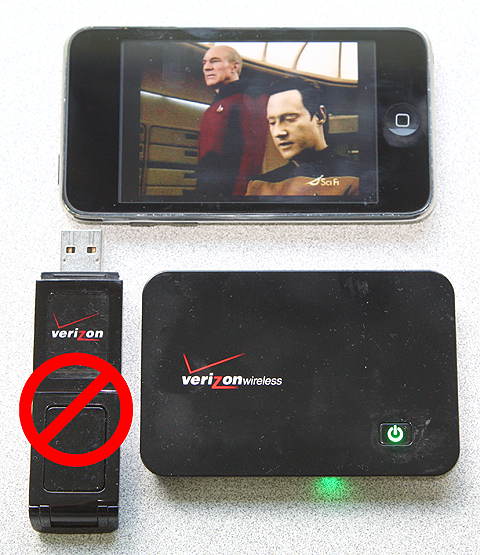
Watching TV on my iTouch with MiFi

Earlier this month I wrote how much I was looking forward to the new Verizon MiFi device. I was so looking forward to this product I showed up at the Verizon store the day it was released. This credit card size device allows me to be my very own personal Wi-Fi “Hotspot”.


Using my laptop when I travel the MiFi replaces my old Verizon USB modem and provides the same bandwidth. As a bonus, the MiFi allows up to 5 connections so my wife and/or grandkids can also use their laptops if we’re stuck in an airport.


One of the main reasons I really wanted the MiFi was to use with my Apple iTouch. I didn’t want an iPhone (which has less memory) to use as my cell, but I did want something to connect me to Twitter, Facebook and other online services. The iTouch supports Wi-Fi so I only had connectivity when I was near a hotspot. Now, I AM a Wi-Fi hotspot where ever I go.


Using Verizon MiFi to watch TV
Watching TV on my iTouch, using Slingbox via MiFi


The same week the MiFi was announced, Slingbox announced Apple had finally approved their iPhone application but with one condition. It wouldn’t allow streaming over the AT&T network but it could use Wi-Fi as a connection. Slingbox is a device connected to my TV/TiVo and the Internet which allows me to watch my TV while I’m out of the house. I figured using the Slingbox software was a great way to test the speed of the MiFi. The result is a B+.


I use DSLReports.com to do my speed tests and was happy with my first speed test using my laptop and MiFi.


So far the only problem I had was obtaining my new MiFi. Verizon announced they would be available on Sunday, May 17th. When I called my local Verizon store they said, they had plenty and I could come pick one up. I wasn’t happy at all when I arrived to find out, I could only order one which wouldn't arrived until Wednesday. I later found out each store was supplied two units and that they were only to be given to new customers. Verizon that’s a big FAIL.

I’ve been using mine for 10 days now and I love it. Riding in the car, waiting to see my doctor, sitting around the pool, looking up something(showing off) at a friends house it’s a great toy. The battery life spec says four hours and so far it has lived up to its claim. The battery died on my iTouch before the MiFi lost power. For more specifications on the MiFi, click here.


Labels: , , ,

Share on Facebook


Thursday, April 09, 2009

Dear Apple, We Don't Want Safari

Have you downloaded and installed Safari?
Would you use it?

Apple has used an interesting approach to market their Safari browser for Windows users.  The folks in Cupertino realized that plenty of Windows users had iTunes. I guess they figured Windows users aren’t too bright so maybe they could trick them into downloading Safari and they would start using it without noticing.


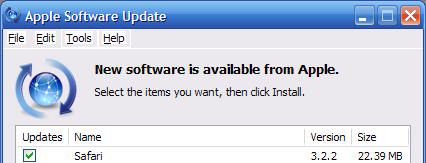
Updating iTunes


I’m not a big fan of autoupdate programs. I’ve written before about annoying updates form Google, Adobe, AOL and Apple. My point today is even with all these efforts Safari still hasn’t made any impact on the browser market.  According to my recent web stats, Safari only has 3.5%.  That includes Mac users!


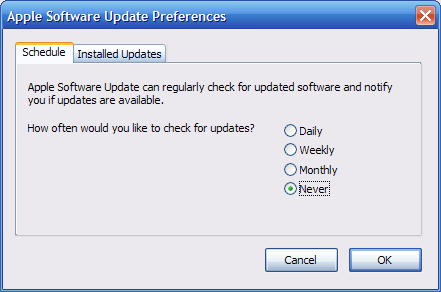
But my setting is not to be updated?
Wait a Minute?
I have my settings set to NEVER!!!


Someone needs to tell Apple that Windows users aren’t stupid. They’ve tried to force Safari on folks for a couple years and it’s just not working. If they really want to enter the browser war they need a new approach.  Maybe we need some commercials with “I’m on a Safari” vs “I’m an Explorer”.


Labels: , ,

Share on Facebook


Monday, July 14, 2008

What is AppleSyncNotifier?

When the iPhone was first released a new file suddenly appeared to everyone who used iTunes. It was called “Apple Mobile Device Service”. You really didn’t need it unless you had an iPhone or an iTouch iPod but that didn’t stop Apple from including it as an Service for all iTunes users.


Now that the iPhone 2.0 is available iTunes is adding a new “MobileMe” file called Apple Sync Notifier. The number one request for PLUS Information from WinPatrol users starting on July 10th has been for AppleSyncNotifier.exe with the title MobleMe.

We’ve added the following tips to the WinPatrol PLUS database.

Applesyncnotifier.exe will be found in your c:\Program Files\Common Files\Apple\Mobile Device Support\bin\ folder. This file installs with iTunes and is used when syncing your iPhone, iTouch, iPod, etc.

There may be problems installing Apple Mobile Device Support with iTunes 7.7 under Windows Vista. Error messages in 'AppleMobileDeviceHelper' when trying to sync your phone could result.

Several possible solutions are discussed at
http://discussions.apple.com/thread.jspa?messageID=7576275. We will update WinPatrol PLUS information as it becomes available.

I now realize how Apple plans to sell more Macs. They keep adding more autostart crapware to anyone using iTunes so Windows continues to slow down and look bad. Apple has already been criticized for trying to sneak their Safari browser download into any new iTunes updates. (Yes, they make it an option but when the option is checked by default, I consider it sneaky). They do the same thing with QuickTime.


Anytime you view a QuickTime movie Apple puts a Quicktime Task helper back in your list of Startup programs. WinPatrol users can mark QTTask.exe as “Disabled” and Scotty will automatically remove it from your Startup list anytime it’s added. Just like the iTunesHelper startup program, you can run it manually when needed instead of it running all the time.

You’ll also find iTunes 7.7 adds an updated service called “Bonjour” or nDNSResponder.exe which is set to run automatically. Apple says the following about the Bonjour Service…

“Enables hardware devices and software services to automatically configure themselves on the network and advertise their presence, so that users can discover and use those services without any unnecessary manual setup or administration.”


Top Ten Reasons to Try WinPatrol Again


Labels: , , , , ,

Share on Facebook


Thursday, July 26, 2007

Apple's Future is still the MacIntosh

Overall it's been a good week for Apple although sales of the iPhone didn't meet expectations. Apple (AAPL) reported quarterly revenue of $5.41 billion dollars which is its 2nd highest in its history. The sale of 1.7 million Macs accounted for 55% as opposed to last years 29.7% piece of the Apple Pie. Apple is now in a tie for 3rd place with Gateway for sales of computers in the US.

Like its revenue, Apple's image is the best it has been in many years. People love the iPod and its polished company image is one of the reasons for an increase in Macintosh sales. It also hasn't hurt that nobody has been standing in lines to get Windows Vista. It appears that 8–9% of my readers are using Vista but that number hasn’t changed much.

The iPhone sales may have been a national event 2nd only to Paris Hilton going to jail, but only half of the expected half million units were sold. AT&T reported Tuesday that 146,000 phone have been activated as of June 30th. That’s not bad, but doesn’t match up with Apples claim of 270,000 phones sold through their stores. Perhaps, a lot of them were purchased to sell on eBay.

I predict that iPod, Mac and MacBook sales are going to continue to grow and will provide a healthy fiscal orchard for Apple. Now that the hype for iPhone has subsided I doubt Apple will meet their goal for 1 million iPhone sales this quarter and 10 million by the end of 2008. It will be interesting to see if the iPhone has the same impact on Apple as the Xbox has had on Microsoft.

Labels: , , ,

Share on Facebook


Friday, July 06, 2007

Do I need Apple Mobile Device Service?

As often as possible, I like to review the list of programs that our WinPatrol members are asking for PLUS Info on. This gives me a good idea of what programs have suddenly been appearing on a users system often without their knowledge.


Most of this year the number one PLUS Info request has been about “GoogleToolbarNotifier.exe”. This little program pops up now and then especially since so many new machines are coming with the Google Toolbar pre-installed. Click here for our PLUS Info


This week a new Windows “service” has suddenly appeared in our top ten. When users upgrade to iTunes 7.3, it comes with a new Automatic Service just in case you’re the proud owner of an iPhone. The file is named “AppleMobileDeviceService.exe” and can be found in your list of Services either using WinPatrol or Services.msc which comes with Windows. Apple says, it “Provides the interface to Apple mobile devices.

It only takes up 3,640K of memory when at rest but if you don’t have an iPhone you really don’t need it. You can stop it with WinPatrol and set it to Manual startup. You’ll also find it under the list of programs in the Add/Remove Control Panel applet so it can be removed completely from there.

To add insult to injury, Apple also just tried to change my default MP3 player to iTunes

Give me a break Apple. This is yet another example of companies who think they can just take over your whole machine. I’m obviously biased but you can protect yourself by downloading WinPatrol for free. If you’re not sure a program can be removed, upgrade to WinPatrol PLUS.


Labels: , , , ,

Share on Facebook


Monday, June 11, 2007

Apple Safari 3 Doesn't Really Suck

This week Apple released a public beta of a Window version of its browser software called Safari 3. Apple claims to already have 5% of the browser market share so they’re hoping to expand this by going after Windows competitors like IE, Firefox and Opera.

Now that Apple has so many people running iTunes on Windows they hope it will help them infiltrate other product categories. I’m not a Mac user but there was a time I developed applications for Apple so I have a professional respect. I also like being a know-it-all so I downloaded Safari 3 and decided to give it a shot.

I expected to have a lot of complaints but so far the experience hasn’t been horrible. Apple’s claim that Safari is “up to 2 times faster than Internet Explorer” is hard to test but it wasn’t any slower. It loads up quickly and has a small footprint both on the screen and in memory usage.

My biggest concern was that Apple was going to install some of their other favorite software, including QuickTime which insists on making itself an autostartup program. I was glad to see that including QuickTime was a download option.


Nice that Apple gives me a choice to not download QuickTime

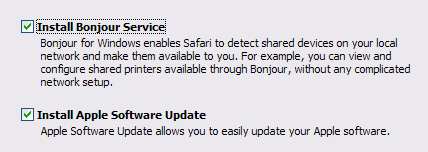
My real surprise and thrill came when I saw a setup dialog which allowed me to choose if I wanted their Bonjour service and if I wanted their Auto Update program to be installed. If you’ve read my Blog before you know how I feel about Auto Update programs. Three Cheers for APPLE!!! If the default was Unchecked I’d give them four cheers.

Yay Apple for giving users a real choice. Would be nicer is the default checkbox was off.
If checked, Apple Software Update will be added to the Run registry and will check for new versions of QuickTime, iTunes and Safari. Unlike QuickTime, it can later be removed without a struggle.

Now for what annoys me

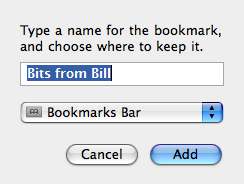
Apple insists on using their own Human Interface Guidelines even when they create programs for Windows users. While their buttons are intuitive for Mac users, they should adjust the UI for folks used to Windows standards.

Safari Add Bookmark Dialog
Apple interface on a Windows machine is just wrong
Notice the Cancel button is on the
left and Add(the action button) is
on the right most position per Apple
Human Interface Guidelines.


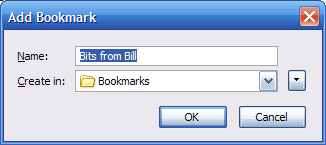
Add Bookmark on Firefox 2
Firefox Add Bookmark screen uses standard Windows interface
As typical Windows users, we’re all acclimated to
the Cancel button being on the right or bottom.
The “Action” button it to the left of it.

There are still plenty of other tests I need to make but it’s worth the effort. If you’d like to try Safari 3, you can download it yourself at http://www.apple.com/safari/.

Labels: , ,

Share on Facebook


Sunday, April 15, 2007

Apple Ad Could Improve New Windows PC's

In their latest Ad campaign Apple Computer has finally pointed out one of the biggest flaw in new PC's.

Computer OEM's have a decision to make. While they can make more profit by including third party applications, is it worth the cost of the support calls from new PC owners?

When someone purchases a new PC you want them to be happy. The only reason you ever want them contacting you again is to make another purchase. I suspect support costs are high enough due to the new Vista Operating System. They don't need complicated support issues caused by third party applications or what Walt Mossberg calls "Craplets".

Perhaps this new Apple Ad will wake some folks up. Meanwhile, we'll continue to recommend WinPatrol as the best crapware cleaner you can get for any new system.

Labels: , , , ,

Share on Facebook