Bits from Bill

Technology thoughts leaking from the brain of "Bill Pytlovany"

Thursday, April 09, 2009

Dear Apple, We Don't Want Safari

Have you downloaded and installed Safari?
Would you use it?

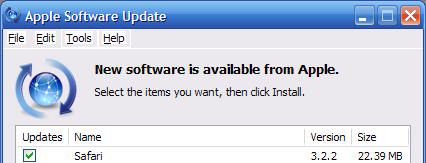
Apple has used an interesting approach to market their Safari browser for Windows users.  The folks in Cupertino realized that plenty of Windows users had iTunes. I guess they figured Windows users aren’t too bright so maybe they could trick them into downloading Safari and they would start using it without noticing.


Updating iTunes


I’m not a big fan of autoupdate programs. I’ve written before about annoying updates form Google, Adobe, AOL and Apple. My point today is even with all these efforts Safari still hasn’t made any impact on the browser market.  According to my recent web stats, Safari only has 3.5%.  That includes Mac users!


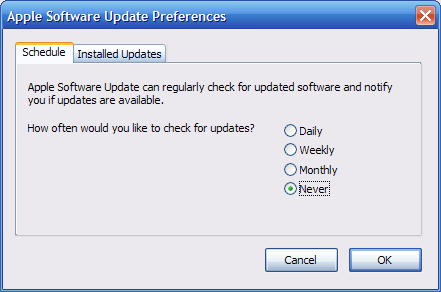
But my setting is not to be updated?
Wait a Minute?
I have my settings set to NEVER!!!


Someone needs to tell Apple that Windows users aren’t stupid. They’ve tried to force Safari on folks for a couple years and it’s just not working. If they really want to enter the browser war they need a new approach.  Maybe we need some commercials with “I’m on a Safari” vs “I’m an Explorer”.


Labels: , ,

Share on Facebook


Thursday, March 27, 2008

Apple Bad Habits Punish Windows Users

It seems like Apple just wants to punish Windows users while they make deals and slowly infiltrate our machines. I haven't used an Apple computer for years but I don't remember them treating their own customers so badly.

  • One bad habit has been around for a while in the QuickTime video player. Anytime you view a Quicktime encoded video, Apple automatically adds the program, qttask.exe to the Windows registry so it will automatically run anytime you reboot. This was one of the reasons why I created the "Disable" button in WinPatrol so it could automatically be removed.

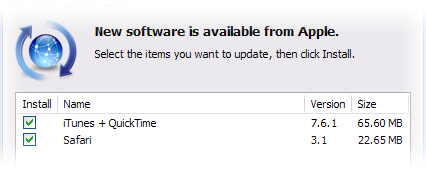
  • A recent bad habit getting a lot of attention is their effort to sneak the Safari browser on to your machine when you update your iPod/QuickTime software. There have been many cries that Apple Safari is Malware. Just like your typical adware company Apple claims “it's an option” but when the option is pre-checked we all know most people won’t even notice it. That’s considered a user decision to accept it.

The option to install Safari is prechecked
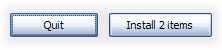
It’s especially disrespectful since Apple Human Interface Guidelines put the “action” button on the far right where Windows users are accustom to a Quit,Close or Cancel button. If you’re doing a Windows application then use Windows UI guidelines. (BillP Pet Peeve)
Apple Human Interface Guidelines are different from Windows.


Fun Side Note
: According to the Safari EULA, “Apple forbids Windows users from installing Safari for Windows”

  • This morning I realized most people will receive QuickTime whether they want it or not. Much to my surprise I was told I should install QuickTime when all I wanted to do was look up my credit card balance.

I just wanted to check out my credit card bill and needed Quicktime?

It didn’t matter what I said.

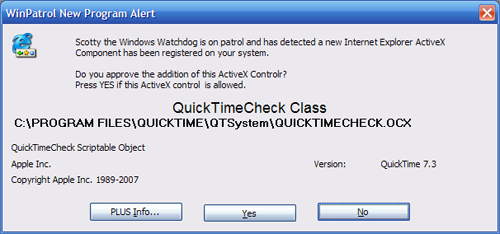
One of the features I’m working on for WinPatrol 2008 is monitoring and control of ActiveX controls. It seems like once a week we’re hearing about vulnerabilities in ActiveX components so I want to give users immediate control instead of waiting for the next patch. The alert below appeared when I was just checking my credit card bill.


New ActiveX control from Apple


After digging a little it turns out the QuickTime component was part of a Google ad-sense box which was located on the main chase.com page. So not only is my credit card company charging me for my card, they’re trying to make money advertising to me. I’m getting off topic now but you get the idea.

I guess I really need to get WinPatrol 2008 released soon or it will be time to dig my Mac programming manuals out of the attic. How does “QuickPatrol” sound?

Labels: , , ,

Share on Facebook


Monday, June 11, 2007

Apple Safari 3 Doesn't Really Suck

This week Apple released a public beta of a Window version of its browser software called Safari 3. Apple claims to already have 5% of the browser market share so they’re hoping to expand this by going after Windows competitors like IE, Firefox and Opera.

Now that Apple has so many people running iTunes on Windows they hope it will help them infiltrate other product categories. I’m not a Mac user but there was a time I developed applications for Apple so I have a professional respect. I also like being a know-it-all so I downloaded Safari 3 and decided to give it a shot.

I expected to have a lot of complaints but so far the experience hasn’t been horrible. Apple’s claim that Safari is “up to 2 times faster than Internet Explorer” is hard to test but it wasn’t any slower. It loads up quickly and has a small footprint both on the screen and in memory usage.

My biggest concern was that Apple was going to install some of their other favorite software, including QuickTime which insists on making itself an autostartup program. I was glad to see that including QuickTime was a download option.
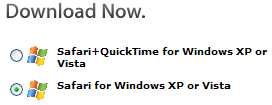

Nice that Apple gives me a choice to not download QuickTime

My real surprise and thrill came when I saw a setup dialog which allowed me to choose if I wanted their Bonjour service and if I wanted their Auto Update program to be installed. If you’ve read my Blog before you know how I feel about Auto Update programs. Three Cheers for APPLE!!! If the default was Unchecked I’d give them four cheers.
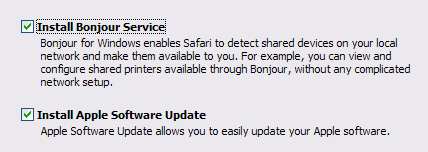
Yay Apple for giving users a real choice. Would be nicer is the default checkbox was off.
If checked, Apple Software Update will be added to the Run registry and will check for new versions of QuickTime, iTunes and Safari. Unlike QuickTime, it can later be removed without a struggle.

Now for what annoys me

Apple insists on using their own Human Interface Guidelines even when they create programs for Windows users. While their buttons are intuitive for Mac users, they should adjust the UI for folks used to Windows standards.

Safari Add Bookmark Dialog
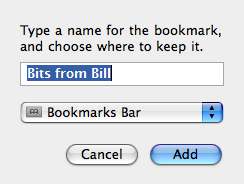
Apple interface on a Windows machine is just wrong
Notice the Cancel button is on the
left and Add(the action button) is
on the right most position per Apple
Human Interface Guidelines.


Add Bookmark on Firefox 2
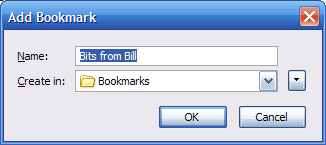
Firefox Add Bookmark screen uses standard Windows interface
As typical Windows users, we’re all acclimated to
the Cancel button being on the right or bottom.
The “Action” button it to the left of it.

There are still plenty of other tests I need to make but it’s worth the effort. If you’d like to try Safari 3, you can download it yourself at http://www.apple.com/safari/.

Labels: , ,

Share on Facebook