Bits from Bill

Technology thoughts leaking from the brain of "Bill Pytlovany"

Monday, March 17, 2014

Safe Updates & Discounts For Windows XP

There are a variety of services that help keep your important software updated. We've added a  "Check for Safe Updates" button  to integrate a new version checking feature directly into WinPatrol. It won’t be the most powerful but in the WinPatrol spirit our goal is to make sure updates are safe and folks are educated to all possible risks.
safeversionbutton


Previously this button checked for new versions of WinPatrol but it has been expanded to include version checks for popular software packages. When you click this button we'll compare your version against the newest safe version available. If updating is recommended you'll see a safe link that goes to the official download page for the software.

This is critical because bogus sites are showing up on the top results page with Google, Bing and other search engines. It's easy to find yourself on web page that tries to trick you into downloading software wrapped with a setup program that installs additional unwanted software.

Even a legitimate company like Oracle has partnered with toolbar and anti-virus companies. The revenue they get when anyone installs the parasitic software is significant. Considering the installed base of Java users and now often they need security updates it’s a very lucrative market. The WinPatrol PLUS Safe Update Engine will also warn you about these threats and show you sample screen shots of what you might expect.

javaask
Every time a new version of Java is available Oracle will try to push other software unrelated to Java. In some cases they’ll receive over a dollar for each customer lead.

Restore Deleted Files

Our second big feature came after feedback from radio host and America’s Digital Goddess, Kim Komando. In a recent article, Kim recommended WinPatrol but cautioned her readers about the dangers of deleting files that may be required. WinPatrol has always provided a History button that allows you to Restore any Startup Programs but she had a point when it comes to the removal of hidden files.

The files will now quarantined in a WinPatrol vault. We will also include a command line scripts that can be used to restore any files that had been hidden. The command-line scripts are created for a worse-case scenario when someone deletes a file that is required for Windows to run. The script or .bat file can be run in safe mode or a command-line mode.

PLUS Discount for Windows XP

The new Safe Update Engine will also detect which version of Windows you're running. If appropriate we will advise you to any potential problems. For instance, if someone is still using Windows XP we will offer timely protection tips. It’s clear not everyone can or will be upgrading immediately. Some businesses have software or hardware that still requires Windows XP.  Unfortunately, an XP machine could be infiltrated and turned into a "bot" that could be used to send SPAM or deploy viruses.

If our Safe Update Engine detects you're using Windows XP you'll see a link to a special Windows XP purchase page. The name of this page will routinely change but it will have a PayPal button that allows you to upgrade to WinPatrol PLUS for only $2.00 USD. If you can’t afford a Windows upgrade we’ll make sure WinPatrol PLUS is affordable.

safeupdatexp

This is section of the results provided by the WinPatrol PLUS Safe Update Engine. In this example, the special offer is provided when the Safe Update feature detects Windows XP is running.

Labels: , , , , , , , , , , ,

Share on Facebook


Monday, June 08, 2009

Mystery Filenames that Make No Sense

Have you ever notice a filename that is so bizarre you think it must be some kind of malware? Microsoft Windows has supported long filenames for years but most folks still haven’t caught on. Microsoft is especially guilty of using short useless filenames like lsass.exe, mdm.exe and the most infamous ctfmon.exe.


One of the features of WinPatrol PLUS is the ability to click on a filename and receive a human readable explanation. We try our best to let you know what a file does, if it’s safe and why you might need it. I keep track of all the requests to make sure I’ll can catch any new mystery files, good or bad.


I’ve taken a snapshot of all our PLUS Info from last month and thought I’d share some of the top requests with all my readers.


The number one mystery file that people want to know about continues to be “CTFMON.exe”. Here’s a little of what you’ll read in our PLUS databae.

CTFMON.exe

CTFMON.exe
Ctfmon.exe activates the Alternative User Input Text Input Processor (TIP) and the Microsoft Office Language Bar. It monitors the active windows and provides text input service support for speech recognition, handwriting recognition, keyboard, translation, and other alternative user input technologies. Initially it only installed with Microsoft Office 2002 and XP. Now it may be used by a number of Microsoft programs that supports alternative user input. When you run such a program, the file Ctfmon.exe runs in the background. It remains in memory even after you quit the program. More detail on what the program does can be found at http://support.microsoft.com/default.aspx?scid=kb;EN-US;q282599 and at http://support.microsoft.com/?kbid=823586.


While Microsoft typically holds the number one spot they aren’t the only one with startup programs with mystery filename.

Adobe Acrobat Speed Launch – READER_SL.EXE
Reader_sl.exe installs with Adobe Acrobat reader 7 or later as its "speed launch" utility. This file runs on system setup and pre-loads the acrobat reader so that it will launch more quickly when needed.

There are multiple versions of the speed launch feature available. Typically they install with different versions of Acrobat but they all do the same thing. You shouldn't need more than one of these files running on system startup in order to get the benefit of the faster launch: reader_sl.exe, sc_acrobat.exe, _sc_acrobat.exe, sc_reader.exe, and acrobat_sl.exe. You'll find more information on Speed Launch for Adobe Acrobat, Adobe Reader, and Acrobat 3D at http://www.adobe.com/cfusion/knowledgebase/index.cfm?id=331131.


Sun JAVA
Sun's Java BHO – SSV.DLL
Ssv.dll is a browser helper object that installs with the Sun Java Runtime Environment and Java 2 Platform Standard Edition 5.0 Update 6 or later. It will appear in your c:\Program Files\Java\jre_1.5.0 folder (name varies with version number). SSV stands for Secure Static Version. It is a feature that allows an HTML file to specify which JRE family to run.

For more information about this feature, please see the documents Deploying Java Applets With Family JRE Versions in Java Plug-in for Internet Explorer: http://java.sun.com/javase/6/webnotes/family-clsid.html and the alert Java Plug-in and Java Web Start May Allow Applets and Applications to Run With Unpatched JRE: http://sunsolve.sun.com/search/document.do?assetkey=1-26-102557-1.


Other popular file searches this past month include many programs which aren’t necessary. Programs that run in the background just to see if you need an updated version are far too popular. As you can see, the filenames rarely give you a clue what these files do.

OSA.EXE, OSA9.EXE - Office Startup Assistant
MDNSRESPONDER.EXE - part of Apple Bonjour
JUSCHED.EXE - Sun's Java Plug-in Updater
NVSTARTUP, NVCPL.DLL - NVidia Graphics system tray applet
MSASCUI.EXE - Obviously is Windows Defender
QTTASK.EXE - Apple Quicktime Player always come back unless disabled with WinPatrol.
SMSS.EXE - Session Manager Subsystem of course


Google, Adobe and Apple are actually the ones using long filenames most often even though we don’t normally need their programs running in the background.


Google Updater
GOOGLETOOLBARNOTIFIER.exe
GOOGLEUPDATERSERVICE.exe - Not required programs but at least you get a clue to what they do.


Adobe Updater
ADOBEUPDATER.exeGiven how many vulnerabilities Adobe has been running into lately it might be worth running this one.


Apple Mobile Services
APPLEMOBILEDEVICESERVICE.exe - Apple iTunes Mobile Connection doesn’t need to be running all the time and will be installed with iTunes even if you have a regular iPod that doesn’t use mobile services of the iPhone or iTouch.


Labels: , , ,

Share on Facebook


Sunday, April 26, 2009

Sun Java Promoting Microsoft Toolbar

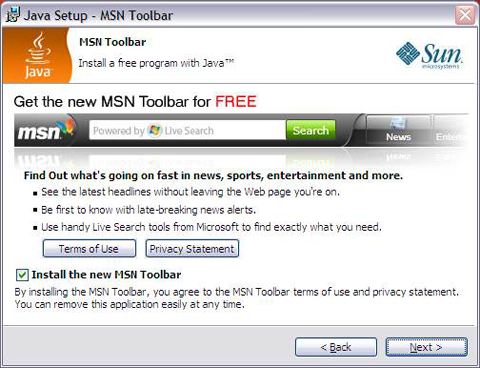
I’ve written more than once about annoying toolbars but I ran into one today that just made me laugh.  I was updating Java and during the setup, they encouraged me to “Get the new MSN Toolbar for FREE”.


Sun Java promoting the MSN Toolbar


While this is annoying, it’s ironic in so many ways. At one time, Java was on a path to change the computing world and was expected to be one of the hottest technologies of the decade.  That was before Microsoft bastardized Java and eventually killed support for it.  While Java is still a great tool it never reached the popular role it was once destined for.


Even more ironic was that I was updating Java on my Google Chrome Browser.  The idea of using an MSN Toolbar on Chrome is truly bizarre.


As I’ve indicated in the past, the economics of hoisting toolbars on unsuspecting downloads is force to be reckoned with. Sun and its Java line will soon be owned by Oracle but I don’t expect any change in toolbar deals.
April 20th: Oracle to Buy Sun


As I completed this article I read that a dreaded cease & desist order was recently sent the download site Softpedia by makers of Comodo Internet Security. Softpedia has their own standards for classifying software and categorized Comodo as “adware” because they bundled the Ask.com toolbar. They’re not exactly alone.
Softpedia Review of WinPatrol

 As a result of this threat of legal action, Softpedia has chosen to remove any Comodo products from their online library. Hopefully, Comodo won’t threaten others who call them out like the Calendar of Update Installers Hall of Shame.


Labels: , , , ,

Share on Facebook