Bits from Bill

Technology thoughts leaking from the brain of "Bill Pytlovany"

Tuesday, April 29, 2014

Computer Security Will Never Be the Same

This has been a remarkable month and the impact on how I view computer security will never be the same. The last time anything like this occurred was in the 90’s when I was infected with a complex worm looking to steal AOL passwords. When customer support told me to format my hard drive it encouraged me to create WinPatrol. The concept used in WinPatrol had never been done before but since my programming skills were busy on other projects it remained just a side project.

aprilI started April 2014 making it clear what Microsoft’s lack of support for Windows XP would really mean. By the end of the month the worse case prediction appears to be coming true. Microsoft received details of an active zero-Day vulnerability from security platform developer,
FireEye.  Not only does this threat affect nearly all versions of Internet Explorer and Windows,  attacks using this vulnerability are currently being reported. 

The software  already “in the wild” uses a Flash(.swf) file to call JavaScript in Internet Explorer eventually accessing protected memory that had been randomized as a form of protection. The entry method has been a known flaw since last October but until now wasn’t found to trigger this kind of attack. Microsoft has posted a new security advisory at https://technet.microsoft.com/en-US/library/security/2963983. The Microsoft Security Response Center has been working through the weekend  testing a solution they hope to release soon.  Even though the flaw is in Internet Explorer if you’re using Windows XP you won’t receive an update. No matter how much you’re tempted to view a video you hear about on Facebook, Twitter or in your Email, don’t do it.

tvbleed

The other major concern in April was called Heartbleed.  While the media coverage was over the top, few really understood what this software failure meant.  You may have heard that 66% of the worlds web servers were affected. In fact, less than 7% were actually running a version of the program OpenSSL that allowed access to 64kb chucks of data belonging to others.  Even with this seemingly low number, Heartbleed opens up a couple of troubling issues. Problem #1: Data exposed by this flaw was raw and unencrypted. It was available to anyone no matter how secure you made your computer or how sophisticated the attack. The attacker didn’t need to know you to access your data.  Problem #2: This event demonstrated how defenseless we all are any time we use the Internet. This was the result of a programmer and reviewers missing a simple error. I can only imagine how much of the Internet uses software with existing backdoors created by design.

This year I’ve done a lot to make WinPatrol easier and useful to a wider audience. Given these serious threats my motivation hasn’t diminished.fontalert The basic concept of WinPatrol detecting changes continues to be a model that make sense. While some attacks may require the PLUS version we have one advantage. Ironically, WinPatrol isn’t always taken seriously so it continues to notify users while many popular Anti-Virus programs are disabled.

.


UPDATE 5/2/2014
Microsoft has released a security update on May 1st.  This update will repair the failure found in Microsoft Internet Explorer.
Security Garden: Out of Band Security Update for IE Zero-Day Vulnerability
The patch is available as a Windows Auto Update.   Microsoft surprised many by making this available on machines running Windows XP.
WinBeta: I’m sorry Windows XP users, but Microsoft shouldn’t have patched your OS

Labels: , , , , , , , , , , ,

Share on Facebook


Monday, March 17, 2014

Safe Updates & Discounts For Windows XP

There are a variety of services that help keep your important software updated. We've added a  "Check for Safe Updates" button  to integrate a new version checking feature directly into WinPatrol. It won’t be the most powerful but in the WinPatrol spirit our goal is to make sure updates are safe and folks are educated to all possible risks.
safeversionbutton


Previously this button checked for new versions of WinPatrol but it has been expanded to include version checks for popular software packages. When you click this button we'll compare your version against the newest safe version available. If updating is recommended you'll see a safe link that goes to the official download page for the software.

This is critical because bogus sites are showing up on the top results page with Google, Bing and other search engines. It's easy to find yourself on web page that tries to trick you into downloading software wrapped with a setup program that installs additional unwanted software.

Even a legitimate company like Oracle has partnered with toolbar and anti-virus companies. The revenue they get when anyone installs the parasitic software is significant. Considering the installed base of Java users and now often they need security updates it’s a very lucrative market. The WinPatrol PLUS Safe Update Engine will also warn you about these threats and show you sample screen shots of what you might expect.

javaask
Every time a new version of Java is available Oracle will try to push other software unrelated to Java. In some cases they’ll receive over a dollar for each customer lead.

Restore Deleted Files

Our second big feature came after feedback from radio host and America’s Digital Goddess, Kim Komando. In a recent article, Kim recommended WinPatrol but cautioned her readers about the dangers of deleting files that may be required. WinPatrol has always provided a History button that allows you to Restore any Startup Programs but she had a point when it comes to the removal of hidden files.

The files will now quarantined in a WinPatrol vault. We will also include a command line scripts that can be used to restore any files that had been hidden. The command-line scripts are created for a worse-case scenario when someone deletes a file that is required for Windows to run. The script or .bat file can be run in safe mode or a command-line mode.

PLUS Discount for Windows XP

The new Safe Update Engine will also detect which version of Windows you're running. If appropriate we will advise you to any potential problems. For instance, if someone is still using Windows XP we will offer timely protection tips. It’s clear not everyone can or will be upgrading immediately. Some businesses have software or hardware that still requires Windows XP.  Unfortunately, an XP machine could be infiltrated and turned into a "bot" that could be used to send SPAM or deploy viruses.

If our Safe Update Engine detects you're using Windows XP you'll see a link to a special Windows XP purchase page. The name of this page will routinely change but it will have a PayPal button that allows you to upgrade to WinPatrol PLUS for only $2.00 USD. If you can’t afford a Windows upgrade we’ll make sure WinPatrol PLUS is affordable.

safeupdatexp

This is section of the results provided by the WinPatrol PLUS Safe Update Engine. In this example, the special offer is provided when the Safe Update feature detects Windows XP is running.

Labels: , , , , , , , , , , ,

Share on Facebook


Monday, March 16, 2009

WinPatrol 2009 Available Today

It’s been too long since I’ve released a new version of WinPatrol so I’m pleased to announce the immediate availability of WinPatrol 2009. Since last year I’ve had great feedback and support from WinPatrol users. Most of the new features are the direct result of your feedback.


WinPatrol 2009


WinPatrol 2009: What's New

  • New "Recent" tab lets you see new programs and settings recently added to your computer. Especially helpful in finding malware that comes with multiple randomly named files.
    WinPatrol new Recent tab
    As seen on Windows 7

  • Compatibility enhancements to work with Windows Vista and Windows 7

  • Monitors and alerts to any changes to User Account Control Settings(UAC)
    No matter if its malware or over jealous security programs.

  • Continues to have the best performance and smallest foot print of any system monitor

  • Hide individual alert messages and lock settings to prevent potential errors by other computer users.
    WinPatrol Hide Alerts
    As seen on Windows XP

More Information available at http://www.winpatrol.com/upgrade.html


Labels: ,

Share on Facebook


Sunday, March 09, 2008

Faster Computing by Disabling Services

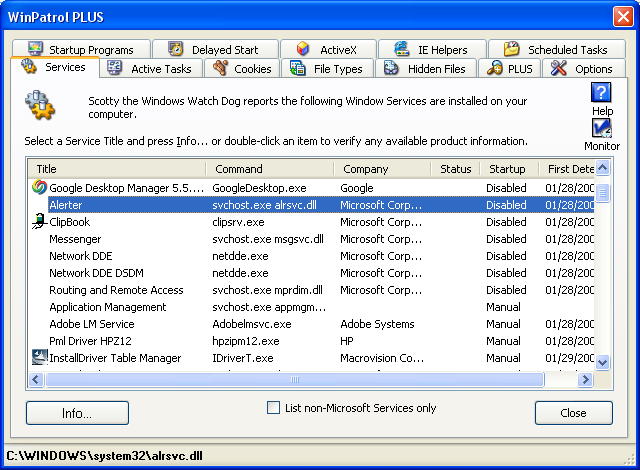
Disabling normal Startup/AutoRun Programs can really speed up your system. Picking and choosing some programs that aren’t needed to run all the time is a straight forward decision. Versions of Windows based on NT technology like XP and Vista include programs called “Windows Services”. These programs may also be set to run on bootup or automatically when other programs launch. Deciding what Services can be disabled or set to manual may not always be obvious.

Many of the services from Microsoft are integral parts of the Windows operating system. Some services that may not sound needed could be required by other Microsoft services. Some Services that don’t seem necessary today could be expected by new software or hardware components that you add in the future.

Bill Detwiler at Tech Republic has created a list of common Windows Services and included recommendations for which services can be disabled. The six page white paper also includes suggested settings along with special considerations. If you really like the minimum programs running on your system check it out by clicking here. (update: Registration is required)


WinPatrol Services
Services Tab using WinPatrol

When I first added the Services tab to WinPatrol there were very few non-Microsoft service components. Now, many new programs include one or more Services. You’ll find many of the autoupdate programs these days are Services. The options for services are Automatic, Manual and Disable. When I’m not sure if something can be Disabled, I’ll set it to manual so it’s still available when needed but won’t run on boot up.

Update 03/16: Some comments have been left with tips on other sites that provide information on Windows Services.

Black Viper: http://www.blackviper.com/WinXP/servicecfg.htm

Speedy Vista: http://www.speedyvista.com/services.html


Labels: , , ,

Share on Facebook