Bits from Bill

Technology thoughts leaking from the brain of "Bill Pytlovany"

Tuesday, April 29, 2014

Computer Security Will Never Be the Same

This has been a remarkable month and the impact on how I view computer security will never be the same. The last time anything like this occurred was in the 90’s when I was infected with a complex worm looking to steal AOL passwords. When customer support told me to format my hard drive it encouraged me to create WinPatrol. The concept used in WinPatrol had never been done before but since my programming skills were busy on other projects it remained just a side project.

aprilI started April 2014 making it clear what Microsoft’s lack of support for Windows XP would really mean. By the end of the month the worse case prediction appears to be coming true. Microsoft received details of an active zero-Day vulnerability from security platform developer,
FireEye.  Not only does this threat affect nearly all versions of Internet Explorer and Windows,  attacks using this vulnerability are currently being reported. 

The software  already “in the wild” uses a Flash(.swf) file to call JavaScript in Internet Explorer eventually accessing protected memory that had been randomized as a form of protection. The entry method has been a known flaw since last October but until now wasn’t found to trigger this kind of attack. Microsoft has posted a new security advisory at https://technet.microsoft.com/en-US/library/security/2963983. The Microsoft Security Response Center has been working through the weekend  testing a solution they hope to release soon.  Even though the flaw is in Internet Explorer if you’re using Windows XP you won’t receive an update. No matter how much you’re tempted to view a video you hear about on Facebook, Twitter or in your Email, don’t do it.

tvbleed

The other major concern in April was called Heartbleed.  While the media coverage was over the top, few really understood what this software failure meant.  You may have heard that 66% of the worlds web servers were affected. In fact, less than 7% were actually running a version of the program OpenSSL that allowed access to 64kb chucks of data belonging to others.  Even with this seemingly low number, Heartbleed opens up a couple of troubling issues. Problem #1: Data exposed by this flaw was raw and unencrypted. It was available to anyone no matter how secure you made your computer or how sophisticated the attack. The attacker didn’t need to know you to access your data.  Problem #2: This event demonstrated how defenseless we all are any time we use the Internet. This was the result of a programmer and reviewers missing a simple error. I can only imagine how much of the Internet uses software with existing backdoors created by design.

This year I’ve done a lot to make WinPatrol easier and useful to a wider audience. Given these serious threats my motivation hasn’t diminished.fontalert The basic concept of WinPatrol detecting changes continues to be a model that make sense. While some attacks may require the PLUS version we have one advantage. Ironically, WinPatrol isn’t always taken seriously so it continues to notify users while many popular Anti-Virus programs are disabled.

.


UPDATE 5/2/2014
Microsoft has released a security update on May 1st.  This update will repair the failure found in Microsoft Internet Explorer.
Security Garden: Out of Band Security Update for IE Zero-Day Vulnerability
The patch is available as a Windows Auto Update.   Microsoft surprised many by making this available on machines running Windows XP.
WinBeta: I’m sorry Windows XP users, but Microsoft shouldn’t have patched your OS

Labels: , , , , , , , , , , ,

Share on Facebook


Thursday, April 10, 2014

April Security News is Serious

Many of my friends have been asking for my opinion of a couple security issues which have been in the news.

The first is Windows XP which was launched in September of 2001. Microsoft announced last year that after April 8th, 2014 it would no longer provide support for Windows XP and Office 2003.

The second concern is for something known as HeartBleed. This could be dangerous to anyone who visits a website no matter what kind of device you use.

Microsoft Windows XP
I realize that many of you can not or will not upgrade your computer currently running Windows XP.  It may not happen today or even next month but it’s only a matter of time before your computer is infiltrated and is useless.  Start putting aside some money, backup your data regularly and look for alternates to programs you can’t do without.  I’m sorry but it’s only a matter of time.

If someone on your home or business network is using Windows XP, turn off their access. When their machine is attacked it will compromise your entire network.
mifihotspot[8]

If they really need Internet access consider getting them a separate connection perhaps through their phone or with a separate hotspot.


Many of you asked about using WinPatrol which is a great idea but doesn’t address the big picture. The security guru’s at Microsoft spend a lot of attention on flaws or vulnerabilities in software.  When they find a hole that lets hackers in, they create a patch. After a great deal of testing they release fixes on what we called “Patch Tuesday."

WinPatrol will continue to notify you of regular changes to your computer but the ability to patch vulnerabilities isn’t its specialty. What I will be doing is paying attention to what I hear from hackers. When possible, we will notify WinPatrol users if a particular file or ActiveX component is found to have a vulnerability. WinPatrol PLUS will allow you to disable ActiveX components by setting their Kill Bit. This is the most we can do and will require quick action.

OpenSSL - Heartbleed
On Monday researchers disclosed a serious flaw in a open source program used by almost half the web servers around the globe. A version of the program called OpenSSL allowed hackers to grab a chuck of recently active protected memory.  This memory could contain anything from names and passwords to someone’s grocery list to decoded government or industrial secrets.  Any kind of data that is communicated could be snatched. After collecting unlimited chucks of data a hacker could make a game out of figuring out what segments could be valuable. Each chunk was 64K like the total addressable memory of the Commodore 64.

Some media outlets like the BBC have repeated the advise to change every password you have. There is no trustworthy list of up-to-date/time safe computers but a list created yesterday claims to have tested 10,000 popular sites. Most have been updated by now but you’ll want to be sure before changing any password or even signing on.  An updated list should be available soon.

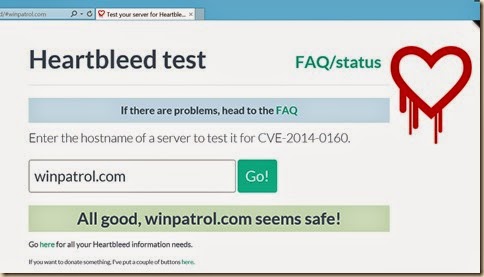
A number of tools for consumers have sprang up allowing you to verify in real-time if a website is currently safe. I found the following to run my own tests.


heartbleed
Click image to test your favorite site

My web sites have been hosted by the company, Verio and I was pleased to see my information was safe It doesn’t mean it was always safe but if not, at least Verio was quick to apply a fix. I can confirm no personal or financial customer data is stored on our web servers.

I wouldn’t necessarily advise you to change all your passwords. Before you do, you’ll certainly want to be sure the company is aware of Heartbleed and has updated their security.  Over 56.8% of the companies on the list of 10,000 are listed as safe because they don’t even use OpenSSL.  Another 36.9% tested safe yesterday. That leaves only 6.3% were vulnerable when the news was announced.

I have changed some of my more important passwords but I regularly changes passwords anyway. I did change my Yahoo passwords since they were mentioned in many news reports and acknowledged using OpenSSL.  Considering Google was involved in disclosing this bug it’s interesting that Yahoo was used as an example. Many friends of Google were notified so they could update their version of  OpenSSL before the information was made public.


While you may notice my tone is not meant to create panic, I personally consider this failure as devastating. I started developing online services for consumers 30+ years ago and this is the “utmost cock-up”.  I don’t fear the damage caused by this threat as much as I worry about what this general lack of  oversight represents.


You can find more details online from our favorite security investigator,
Brian KrebsonSecurity  and official reports sponsored by Homeland Security on the Carnegie Mellon CERT database.   The list of 10,000 is located at
https://github.com/musalbas/heartbleed-masstest/blob/master/top10000.txt

Labels: , , , , , , , , ,

Share on Facebook


Tuesday, July 29, 2008

Bluetooth Security Presentation

As I mentioned yesterday I’ll be speaking at a conference about wireless security and along with WiFi or 802.11 wireless, the topic will cover Bluetooth technology which is widely used today in cell phones. I’m including an outline of my talk and welcome your comments, suggestions and stories.

One important thing to remember is your cell phone is a computer. It stores your personal data and can communicate easily with the world. Proper use includes keeping your data backed up regularly and keeping it secure. One of the common ways your cell phone or PDA communicates is using technology called Bluetooth. Just like your computer, you should know about the following.

  • Discovery Mode
    This is a special mode that allows you to sync or pair up two devices that provide Bluetooth communications. In discovery mode information about your cell phone is readily available to Bluetooth scanners. In most new phones, when you turn on Discovery mode it will only be available for a short time frame. While this sometimes makes it a pain to pair up devices it’s a great safety feature. Your phone should never remain in Discovery Mode.
  • Keep your Phone to yourself
    Don’t let others mess around with your phone. Every phone has a physical Bluetooth network address which can’t be changed. Someone checking out your phone can find this numeric address and use it to communicate with your phone even when it’s not in discovery mode. This unique number can not be changed and will look something like 11:1A:D9:EB:11:C7
  • Passwords
    Just like on your computer your password should not be 1234 or your birthday. It should not be your address, pets name or the same as your ATM pin.
  • Unsoliticated Connection Requests
    Don’t be shocked if you receive a request to connect for an update or what looks like a news story or free ringtone. It’s very possible this could be an illegitimate attempt at a pairing. If you do get an unsolicited request reply No. If it appears to come from your phone company, you can always call them directly to confirm.
  • Update your firmware
    Again, just like on your computer, you should regularly connect to your phone vendor and see if any “firmware” updates are available. It’s possible that some kind of security hole was found in your phone’s software and a firmware update could be needed to repair it.

  • Encryption
    When syncing up your address book or or other data with your computer check to see if encryption is available. This may require you to remember another password but it’s a good idea. While Bluetooth data is designed to only be available in short distances there are antenna’s out there which increase the ability to read Bluetooth data.


Labels: , , ,

Share on Facebook


Monday, July 28, 2008

WiFi Security Presentation

Next month, I’m speaking at a conference of trainers for the National Network to End Domestic Violence. One of my sessions will be about WiFi wireless security geared towards protecting someone’s privacy from potential abusers. I’ve included an outline below which I hope will educational to all but I’m also open to comments about what else I could include.

Frequently a Wireless(WiFi) Router comes as part of the package from Comcast, Time Warner or Verizon FIOS even If you don’t specifically request it. The Wireless router is your connection to the internet and needs to be secure.


· Default Password
The default password for your router is publically available and should be changed to something only you know. This year we’re discovering more malware trying to gain control of your router by trying default passwords. How to access the wireless router control panel should be in your documentation. Typically, it will be as easy as typing in an address like http://192.168.1.1/.


· WEP/WP2 Encryption
The data that goes over the air from your laptop to the router is accessible to anyone else with a software. This data can be jumbled up with encryption so it’s not easy to understand. Typically, this encryption will be called WEP or WP2 and is standard on most wireless routers and the card in your laptop. Your Wireless control panel will allow you to create a simple key that is required by any laptop using your wireless network.


· Extended Range of Wireless devices
Simple WiFi network typically has a range around 100 feet so you might think someone needs to be close to your computer to access your wireless data. New high powered antenna’s and even home grown hacks can be used to extend the range of a wifi network.


· Beware of Free WiFi Networks
It’s often tempting to use what looks like a free WiFi network. You might be in the airport, Starbucks or local book store which has free networking. Make sure you know the name of the network you’re connecting to. Someone with another laptop could configure their machine to appear as if it’s a free network when instead you’d be communicating through their computer while they capture your name and passwords.


I’m sure there’s more I can say so feel free to comment. I’ll also be speaking about Bluetooth security so I’ll be looking for tips on Bluetooth security as well.

Labels: , , ,

Share on Facebook


Tuesday, June 17, 2008

Malware Attacking Your Router

WinPatrol was one of the first to detect malware based on “behavior” of program and continues to follow that model. One behavior we’ve seen a lot of lately is very scary.

Instead of installing malware that continues to run like a key logger or trojan, malicious programs are increasingly attacking the network router which is common with any internet connected home and/or office. An unwanted program can quickly make a change to your router settings that will immediately open all your computers to the world. The bad guys won’t have to install a key logger, they’ll be able to record every byte that goes across your network. It’s happening now to thousands of routers which are still using their default name and password.

Do you know if the password has been changed since your router was purchased?
Do you know how to access your router to change the password?

I’ve run across a number of users who follow all the recommendations to configure their networks for WEP or WPA2 encryption but they never bother to change their default name/password. They’ll even take the time to rename their default SSID but still don’t change the name/password from the factory setting.


It probably won’t surprise you that the factory passwords don’t change much and are widely available. The WinPatrol research group dissected some recent malware threats and could see the routers they were attacking.

  • Linksys, uses the name and password, “admin”. Older units use a blank user name.
  • Belkin, uses blank password for default access
  • Netgear, user name is “admin” and the default password is “password”. Big improvement over their old default “1234”
  • ActionTec, Some unit don't even require an admin login. New devices use "admin" and "password". (updated)
You get the idea. The program recently submitted to our research team had a list of 28 different routers complete with address, name and password clear for anyone to read with the proper tools.

As a security professional I’m reading more and more about vulnerabilities being found in wireless and non-wireless routers. There’s only so much we all can do but the first thing should be to change the default password.


If you don’t know how to access your router, just use your favorite search engine and type in your router name and “change default password”.


Labels: , , , ,

Share on Facebook


Wednesday, June 04, 2008

Is Vista Really More Secure?

First, I’ll admit as much as I’d like to be, I’m not a fan of Vista. I do find myself saying that Vista is more secure and that’s not a bad thing. I’ve noticed that most people associate the increase in security to User Account Control. There’s actually more to Vista security than UAC.


Everyone loves to hate User Account Control because it’s so annoying. Ars technica recently referred to WinPatrol as being UAC for Windows XP which motived me to create some new annoy-proof features. (Coming soon). I was pleased to see that even Vista evangelist Ed bott recently wrote “How Microsoft can fix UAC”. Ed pointed to comments by Sunbelts Software’s Alex Eckelberry who shares my own “cry wolf” fears with UAC. “Since over 80% of all infections are based on social engineering, the popups should focus on that weak point.”


Social engineering is when users are tricked into doing something and end up installing malware that they never wanted. I’ve mentioned many examples of social engineering but my favorite is the hacker who would leave a floppy disk with a virus/worm on it laying around at a company he wanted to infiltrate. On the label of the floppy disk, he hand wrote the words “Employee Salaries”.


Since social engineering isn’t addressed in Vista, is Vista really more secure?


Symantec recently published a number of papers on Vista security. While their work was balanced they weren’t shy pointing out some problems. For instance, most of the code that makes up Vista includes a compiler feature called GS Stack Protection which prevents a popular hack called “Buffer Overflow”. According to Symantec researcher Ollie Whitehouse~150 binaries under the C:\Windows directory that do not contain GS protected code.


According to AV-test.org, UAC stops many rootkits from being installed, and I know Microsoft takes these infiltrations seriously. One of my friends at Microsoft once told me, “They(root kits) scare the bejebers out of us”. Kernel Patch Protection prevents programs from hooking into the guts of Windows and is critical in the prevention of root kit infiltrations. Unfortunately, KPP only works with Vista x64 and breaks attempts at protection from many other security vendors. Thankfully, it’s not a problem for WinPatrol.


Microsoft also considers Windows Auto Update to be a security feature. They recommend users allow auto updates and when new security patches are available on Tuesdays, Windows users are automatically saved from possible threats by newly discovered vulnerabilities. If you’re a regular Bits from Bill reader you’ll know how I feel about auto updates. They’re just plain evil.


Vista Ultimate includes a feature called BitLocker. Essentially, this feature encrypts all data stored on your hard drive. This method has already been hacked by researchers at Princeton and sadly reminds me how much success I had with early Microsoft disk compression. I’ll pass for now.


Microsoft’s Strategy Director Jeff Jones recently published his “Windows Vista One Year Vulnerability Report” and the results show “Windows Vista has an improved security vulnerability profile over its predecessor.”

  • Windows Vista had 30% fewer Security Bulletins than Windows XP
  • Windows Vista had 20% fewer vulnerabilities than Windows XP
  • Windows Vista had 28% fewer Critical and Important vulnerabilities than Windows XP
  • 26 vulnerabilities on Windows Vista are less severe for any users running as standard user.

So, it appears for the 20% of non-Social Engineered vulnerabilities Vista has an advantage. Unfortunately, it’s still not enough for me. As long as any vulnerabilities are being found I’ll continue to be on watch using my favorite protection programs.


Labels: , , ,

Share on Facebook


Tuesday, October 16, 2007

Who is Responsible for URL Security?

Note: This post is more technical in nature than most.

There’s has been a big debate this summer over who should fix a possible security flaw outlined in Security Advisory 943521. Most examples use of malformed “mailto” tags to show how Windows passes along info to the function ShellExecute based on registered url handlers.

In the past, Microsoft has voiced its opinion that it should be the applications responsibility to verify any URL before it’s passed to Windows. Many have encouraged Microsoft to somehow create a global fix with a security patch in Windows.

This was a case where I was on Microsoft’s side of the argument. Of course my reason was selfish because I fear any changes could break the functionality of WinPatrol PLUS requests. This week Microsoft announced it would look at a fix on their end.

Our plan is to revise our URI handling code within ShellExecute() to be more strict”. For the tech savvy, here’s what happens.


“With IE6 installed, ShellExecute() passes the URI to IE which accepts it and inside IE determines it to be invalid. Navigation then fails harmlessly. With Internet Explorer 7 installed, the flow is a bit different. IE7 began to do more validation up front to reject malformed URI's. When this malformed URI with a % was rejected by IE7, ShellExecute() tries to “fix up” the URI to be usable. During this process, the URI is not safely handled. IE7 rejects the URI, and on Windows Vista ShellExecute() gracefully rejects the URI. That’s not the case on the older versions of Windows like Windows XP and Windows Server 2003 when IE7 is installed.

The % is a very special character. It can be used to hide and embed potentially dangerous code. It can also be used to represent characters which in my case, I want to pass in the parameters of an url. For instance, %20 represents a space character which is safer for me to send and easy to parse on our server. It’s also used so I can pass & and ? characters within the parameters of my URL request.

Microsoft has not announced a time frame for any fix so I’ll be keeping an eye on this one and my fingers crossed. I’m guessing I won’t be the only one affected by a major change in how ShellExecute handles an Url. If you read my previous post “Windows Versions Are Like SnowFlakes” you’ll see why these changes scare me.


Labels: , , , ,

Share on Facebook


Tuesday, May 22, 2007

Google Online Security

I was pleased to read in Donna’s SecurityFlash that Google has a new blog dedicated to Online Security. I expect we’ll be seeing regular posts so I have added Google Online Security to the list of “Blogs I Read”.

Introducing Google's online security efforts

“Online security is an important topic for Google, our users, and anyone who uses the Internet. The related issues are complex and dynamic and we've been looking for a way to foster discussion on the topic and keep users informed. Thus, we've started this blog where we hope to periodically provide updates on recent trends, interesting findings, and efforts related to online security. Among the issues we'll tackle is malware, which is the subject of our inaugural post.”

Click to Read the Introductory Post.

I’m glad that Google is using their own Blogger software for this new initiative. Perhaps it will mean less down time for BlogSpot users.

Labels: , , ,

Share on Facebook