Bits from Bill

Technology thoughts leaking from the brain of "Bill Pytlovany"

Tuesday, April 29, 2014

Computer Security Will Never Be the Same

This has been a remarkable month and the impact on how I view computer security will never be the same. The last time anything like this occurred was in the 90’s when I was infected with a complex worm looking to steal AOL passwords. When customer support told me to format my hard drive it encouraged me to create WinPatrol. The concept used in WinPatrol had never been done before but since my programming skills were busy on other projects it remained just a side project.

aprilI started April 2014 making it clear what Microsoft’s lack of support for Windows XP would really mean. By the end of the month the worse case prediction appears to be coming true. Microsoft received details of an active zero-Day vulnerability from security platform developer,
FireEye.  Not only does this threat affect nearly all versions of Internet Explorer and Windows,  attacks using this vulnerability are currently being reported. 

The software  already “in the wild” uses a Flash(.swf) file to call JavaScript in Internet Explorer eventually accessing protected memory that had been randomized as a form of protection. The entry method has been a known flaw since last October but until now wasn’t found to trigger this kind of attack. Microsoft has posted a new security advisory at https://technet.microsoft.com/en-US/library/security/2963983. The Microsoft Security Response Center has been working through the weekend  testing a solution they hope to release soon.  Even though the flaw is in Internet Explorer if you’re using Windows XP you won’t receive an update. No matter how much you’re tempted to view a video you hear about on Facebook, Twitter or in your Email, don’t do it.

tvbleed

The other major concern in April was called Heartbleed.  While the media coverage was over the top, few really understood what this software failure meant.  You may have heard that 66% of the worlds web servers were affected. In fact, less than 7% were actually running a version of the program OpenSSL that allowed access to 64kb chucks of data belonging to others.  Even with this seemingly low number, Heartbleed opens up a couple of troubling issues. Problem #1: Data exposed by this flaw was raw and unencrypted. It was available to anyone no matter how secure you made your computer or how sophisticated the attack. The attacker didn’t need to know you to access your data.  Problem #2: This event demonstrated how defenseless we all are any time we use the Internet. This was the result of a programmer and reviewers missing a simple error. I can only imagine how much of the Internet uses software with existing backdoors created by design.

This year I’ve done a lot to make WinPatrol easier and useful to a wider audience. Given these serious threats my motivation hasn’t diminished.fontalert The basic concept of WinPatrol detecting changes continues to be a model that make sense. While some attacks may require the PLUS version we have one advantage. Ironically, WinPatrol isn’t always taken seriously so it continues to notify users while many popular Anti-Virus programs are disabled.

.


UPDATE 5/2/2014
Microsoft has released a security update on May 1st.  This update will repair the failure found in Microsoft Internet Explorer.
Security Garden: Out of Band Security Update for IE Zero-Day Vulnerability
The patch is available as a Windows Auto Update.   Microsoft surprised many by making this available on machines running Windows XP.
WinBeta: I’m sorry Windows XP users, but Microsoft shouldn’t have patched your OS

Labels: , , , , , , , , , , ,

Share on Facebook


Friday, July 31, 2009

Security Vulnerabilities near Apocalyptic Proportions

We’ve had a heck of a week in the security world. I really don’t know where to begin. Most people think of the Apocalypse as the end of the world but the origin of the term is the “disclosure to certain privileged persons of something hidden from the majority of humankind”. That’s what happen this week. Those who were paying attention were informed about a number of security flaws that hopefully have been corrected. If you haven’t taken advantage of these updates you should.

The first came from Microsoft with what’s called an “out of band” security update. If you think it sounds serious, you’re correct. If you don’t have automatic updates on your Windows machine, it’s time to run the Windows update program.

Microsoft Security Advisory 973882
Microsoft Security Bulletins MS09-034 and MS09-035


Also on Tuesday the folks at Mozilla admitted there’s a vulnerability in Firefox where “The URL in the address bar can be spoofed when a new window or tab is opened by a malicious web page.” This could result in a phishing attack and not necessarily a huge issue. Mozilla has found and fixed this issue which will be rolled out in the next release.


On Thursday Adobe announced “Security updates available for Adobe Flash Player.“ This vulnerability could allow an attacker to take control of your machine if you’re running Windows, Mac OS and even Linux. More info at http://www.adobe.com/support/security/bulletins/apsb09-10.html. Adobe also recognizes that their Shockwave Player is affected by the recent Microsoft advisory so they recommend upgrading to the newest Shockwave Player at http://www.adobe.com/support/security/bulletins/apsb09-11.html


The fun really began at the BlackHat Security conference when three researchers acknowledged they provided Apple with details on how they could hack into and take control of someone's iPhone. They gave Apple two weeks to fix the problem before making the information public. Apple announced today they will be updating users the next time they plug their iPhones into their computers. Unfortunately, one of the vulnerabilities discovered affects more than just the iPhone. A large number of phones which accept SMS messaging may be at risk.


Before you want to go running for the hills I’ll share one last bit of news. Remember all the talk earlier this year about the Conficker virus? Well, stay-tuned this month to hear about the financial trojan called Clampi. This one may also get more attention then you think it deserves but there’s no doubt what the purpose of Clampi is. It’s all about the money.

Clampi banking trojan misdirects business wire transfers.”


Have a great weekend!


Labels: , , ,

Share on Facebook


Friday, July 17, 2009

Firefox 3.5.1 Fix for Vulnerability

Yesterday I wrote about a vulnerability recently discovered in the month old Firefox 3.5. The folks at Mozilla were quick to find a solution and have published a new build which is safe to use.


If you’re a Firefox users go to the following site to update your browser.

http://www.mozilla.com/en-US/firefox/firefox.html


If you followed the instructions to disable the JIT(Just-in-Time) compiler you’ll want to enable it again once you’ve installed version 3.5.1.

  1. Enter about:config in the browser’s location bar.
  2. Type jit in the Filter box at the top of the config editor.
  3. Double-click the line containing javascript.options.jit.contentsetting the value to true.

Labels: ,

Share on Facebook


Wednesday, July 15, 2009

Firefox 3.5 Finally Gets Attention

Last month the Mozilla folks were celebrating the release of Firefox 3.5 but for some reason nobody noticed. Last summer the release of Firefox 3 set a Guinness World Record for the most downloaded software in a 24 hour period.


Firefox 3.5


Even with over a weeks notice, downloads and enthusiasm for Firefox 3.5 just wasn’t the same. Maybe everyone was still tweeting about the election in Iran because the new release of Firefox certainly didn’t get the attention it deserved.


Yesterday Firefox 3.5 finally made it into the news and into the top tweets. Unfortunately, the news was a vulnerability was found in Firefox’s super fast JIT (Just-in-Time) JavaScript compiler


While some have recommend disabiling JavaScipt completely there is a solution that will temporarily disabled the JIT feature until Mozilla provides a patch.


According to the Mozilla Security Blog you just need to do the following…


  1. Enter about:config in the browser’s location bar.
  2. Type jit in the Filter box at the top of the config editor.
  3. Double-click the line containing javascript.options.jit.content setting the value to false.

You can watch for updates and check the Mozilla Blog at http://blog.mozilla.com to see when a fix is published. Once you receive the update, you’ll want to go back to the instructions above and set javascript.options.jit.content to True. That way you’ll still get the benefits of the faster JavaScript engine.

Update: A new version is now available to resolve this vulnerability. http://www.mozilla.com/en-US/firefox/firefox.html


Labels: ,

Share on Facebook


Monday, July 13, 2009

Microsoft Says you are Vulnerable to Attack

Another week, another security vulnerability found and exploited. I can’t stress enough how important it is to use a behavior based monitoring program like WinPatrol. These zero-day vulnerabilities can attack your computer without you doing anything you might consider dangerous. It can happen to anyone, and you can’t just blame it on your kids.


Todays’s Microsoft Security Advisory (973472) relates to components found in Microsoft Office and could allow remote code execution on your machine.

Microsoft is investigating a privately reported vulnerability in Microsoft Office Web Components. An attacker who successfully exploited this vulnerability could gain the same user rights as the local user. When using Internet Explorer, code execution is remote and may not require any user intervention.

We are aware of attacks attempting to exploit the vulnerability.

Brian Krebs at the Washington Post was quick to point out that in last weeks msvidctl.dll vulnerability Microsoft used the words “limited attacks”.

Our good friends at Microsoft have published a quick fix for this problem. If you’re using any of the applications below I recommend taking advantage of the Fix It link below and follow their instructions. If you do experience problems Microsoft does provide a “Disable Fit it” link

Microsoft FixIt
Click above to go to Microsoft Fix it page


  • Microsoft Office Small Business Accounting 2006
  • Microsoft Office 2003 Web Components for the 2007 Microsoft Office system
  • Microsoft Office 2003 Service Pack 3
  • Microsoft Office 2003 Web Components
  • Microsoft Internet Security and Acceleration Server 2004 Standard Edition

Labels: , ,

Share on Facebook


Friday, February 20, 2009

Adobe Gets Sloppy and You're at Risk.

Do you remember a time when you knew your personal computer was safe from infiltration? There was a time when the only danger was from inserting a strange floppy disk. Nowadays, if you’re connected to the Internet every day brings a new threat.


This week’s big vulnerability announcement comes from Adobe and affects their Acrobat and Adobe Reader programs.

“This vulnerability would cause the application to crash and could potentially allow an attacker to take control of the affected system. There are reports that this issue is being exploited. There are reports that this issue is being exploited.

Adobe is planning to release updates to Adobe Reader and Acrobat to resolve the relevant security issue. Adobe expects to make available an update for Adobe Reader 9 and Acrobat 9 by March 11th, 2009"

Now, I’m a Adobe user and aside from their overzealous startup habits I’m a fan of Photoshop and the universal PDF format. Still, I’m having a hard time understanding how anyone could still release any code that is vulnerable to a buffer overflow attack. The technology and programming libraries exist so that only a programmer from the dark ages should allow this kind of behavior.

I don’t claim to be a perfect programmer but a company as big as Adobe should  have a whole crew implementing best practices for their development team.
This is incredibly sloppy and I just don’t get it.


To make matters even worse, Adobe provides no guidance as how to prevent attacks. My advice is to disable any Adobe reader on your system.
If you’re a WinPatrol user, click on the ActiveX tab and sort by company name to find your Adobe components. Select the Acrobat reader and click on Disable.


If you’re not a WinPatrol user you can protect yourself by opening up Acrobat or Adobe Reader and disable Javascript from within that application. You should find it under the Edit menu -> Preferences. You can uncheck the box in front of “Enable Acrobat Javascript”.


It may also be a time to replace your default PDF file reader with a new one. I’m sure some of my readers can comment on what they find is the best alternate for Acrobat so stop back for more information.


Labels: , , ,

Share on Facebook


Tuesday, December 16, 2008

Zero Day Vulnarability for Internet Explorer

Over the years most of you have been inundated with buzz words like virus, spyware, worm, trojan, rootkit and over the last year Zero Day has been popular. The zero-day term refers to an attack or virus which is previously unknown so no patch or virus defination is available to catch it on day zero.  It won’t be caught by your antivirus scanner because they don’t know about it yet. 

A Zero Day “Vulnerability” is the worst. This attack uses a flaw in a program such as the browser that allows code to execute with no warning to a user. You don’t have to be tricked into downloading anything. All you need to do is to visit a web site or in some cases just be connected to the internet. The only protection will be programs like WinPatrol that monitor for changes to your system.

This week Microsoft has released an advisory to protect users until a patch is available.  Click “Vulnerability in Internet Explorer Could Allow Remote Code Execution”. Microsoft advises some pretty serious work arounds including.

  • Set Internet and Local intranet security zone settings to "High" to prompt before running ActiveX Controls and Active Scripting in these zones
  • Configure Internet Explorer to prompt before running Active Scripting or to disable Active Scripting in the Internet and Local intranet security zone
  • Disable XML Island functionality
  • Restrict Internet Explorer from using OLEDB32.dll with an Integrity Level ACL
  • Disable Row Position functionality of OLEDB32.dll
  • Unregister OLEDB32.DLL
  • Use ACL to disable OLEDB32.DLL
  • Enable DEP for Internet Explorer 7 on Windows Vista and on Windows Server 2008
  • Disable Data Binding support in Internet Explorer 8 Beta 2


These are pretty drastic actions but this threat should be taken seriously. Most experts are recommending folks stop using Internet Explorer completely until Microsoft has a patch available. I’m among those experts who also recommends finding a new browser for a while. Personally, I’ve become a fan of Google Chrome which is now out of beta and has an official version 1.

Alternate Browsers in order of my preference:

Download FireFox

Download Google Chrome

Download Opera 

Download Apple Safari (You may have already be tricked into installing this along with iTunes)

Update: Microsoft has released an emergency patch to fix this serious vulnerability.  http://www.microsoft.com/technet/security/bulletin/ms08-078.mspx

Labels: , ,

Share on Facebook


Friday, October 24, 2008

Today's a Good Day to Update

If you’re a regular BitsFromBill.com reader you know how I feel about the concept of auto updating software. I hate autoupdate programs from Apple, Google and Adobe.

Occasionally, the bad guys learn about a vulnerability and are quick to deploy dangerous attacks designed to take advantage newly discovered security holes. When this happens installing an update to protect yourself is worth any risk of updated code.

Today is one of those days. Yesterday Microsoft released security bulletin MS08–067 Vulernability in Server Service Could Allow Remove Code Execution. You might be thinking, “But I have a laptop, not a server”. Well, technically you do have a server and even your laptop is exposed if you’re connected to the internet.

So far the reported attacks seem to be targeted but it won’t be long before internet bots are scanning all IP address for this vulnerability. Microsoft has been a little vague only giving specific details to security providers. This attack can bypass firewalls and users don’t have to visit any webpages to become infected. I’ve read enough to suggest this security patch is a special exception.

So, I don’t know if this update could cause problems but I’ve updated my machines and I recommend you do the same.

http://update.microsoft.com/windowsupdate/v6/default.aspx


Labels: , ,

Share on Facebook


Tuesday, August 19, 2008

Where did my Spyware come from?

Most folks will immediately blame another family member using their computer especially if they have teens in the house. In most case, it’s nobody’s fault if a machine is infected with some kind of spyware/malware/virus/badware, what ever you call it. So how the heck did your computer turn into such a mess.


Social Engineering
The number one method the bad guys have used for years is to just plain trick you. I’m sure you know not to reply to Email from the former ambassador to Nigeria but what if you get an alert message from Microsoft that says they found three viruses on your computer and you must download ie_update.exe?

Recently, we’ve seen updates of Internet Explorer and news videos that claim to be from CNN and MSNBC. They’re all meant to trick users into downloading badware. Convicted hacker Kevin Mitnick tells how in the old days he’d leave a floppy disk laying around public areas of a company with the label “Employee Salaries”.

I recently spoke at a conference for the National Network to End Domestic Violence. A common trick discussed was how perps would send an online greeting card that includes an apology but comes laced with a keylogger so the abuser can spy on all future computer activity.

The use of social engineering to try and take over your computer will continue to be number one method and will certainly improve and get more sophisticated. You’re sure to see a lot of this type before holidays and anytime there’s a huge world wide event.


Software Vulnerability
You probably all know about those regular software updates from Microsoft, Apple, Adobe and others. I’m not a big fan of “auto”updates but downloading security patches isn’t a bad idea. I usually wait until they’ve been released for a week or so and have been tested by the rest of the world. After that I do recommend having your system software updated with any patches available.

A software vulnerability can install a program on your system without downloading or clicking on any suspicious links. Anytime you’re connected to the internet your computer is probed to see if it’s visible and if any vulnerabilities exist. If the right vulnerability exists when your system is polled it can become the property of the first bad guy to find you.

I experienced one years ago when MSBlaster suddenly appeared on my computer. Luckily, WinPatrol was on patrol and I was immediately asked if this was something I had installed. I didn’t know what MSBlaster was so I removed it. This was a brand new threat so none of the anti-spyware/virus programs had any information about msblaster in their signature files.


Music and Porn Sharing
Seriously, I don’t have a lot of first hand research on this particular segment but I do what I have to in the interest of knowledge.

While this may get much of the blame in many households its not as prevalent as it used to be. That’s not to say that surfing for music and porn isn’t a malware mine field, it’s just that infections are a little more obvious. You know you’re in trouble when the only way you can close the browser Window is to completely shut down the browser or reboot your machine.


You don’t really have Spyware
One of the main reasons people purchase new computers is because their old computer is slow due spyware. In many cases when I’ve been asked to clean up spyware I find the system is basically clean. Usually, the computer is old, and has had so many programs installed and uninstalled over the years that the version of Windows on their computer is just plain tired out. How’s that for a technical quote?


Windows is a collection of various programs and libraries. Over many years of installing new programs different versions of Window components may be installed. This can become a big hodgepodge of files and old drivers so that no two versions of Windows are the same. We used to joke that Windows 95 wasn’t the year it was released. It meant every 95 days you should reformat your machine and reinstall Windows from scratch.


My best advice for these machines would be clean up auto start programs, add memory, clear up as much disk space as possible, and especially clean up any temp files including the Internet Explorer cache. Others swear by defragging your disk or using registry cleaners but I’m not a big fan.


Additional References:

Windows Versions are like Snowflakes

AutoUpdates are Evil

Do I Need a Registry Cleaner?

Your PC is NOT old

Labels: , , ,

Share on Facebook


Wednesday, May 28, 2008

Adobe Flash Player Vulnerability

A few of the most powerful web objects always have reports of regular vulnerabilities that can make it dangerous for even the most careful web surfer. Seems like at least once a month I hear about problems with JavaScript, Quicktime and now yet again, Adobe Flash.

As much I hate to recommend disabling such a powerful and useful component I have killed the version of Adobe Flash currently on my system. There are too many reports of infected sites to take any chances. Versions that appear to be affected include 9.0.115.0. and 9.0.124.0.

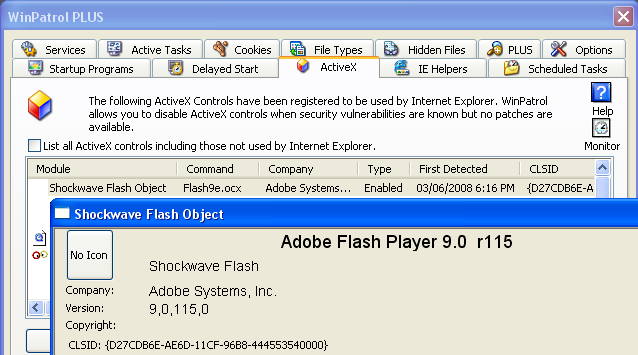
One of the new features of WinPatrol is the ability to disable ActiveX components that exhibit vulnerabilities. This feature is so important it’s included in the free and USB Flash version. If you have WinPatrol you can select Flash9(x).exe and click on Disable. You can always Enable again if you really need to but hopefully a new version of Flash will be released soon.

Disable Flash with WinPatrol
WinPatrol 2008


According to SecurityFocus

“Continued investigation reveals that this issue is fairly widespread. Malicious code is being injected into other third-party domains (approximately 20,000 web pages), most likely through SQL-injection attacks. The code then redirects users to sites hosting malicious Flash files exploiting this issue.“

Note: This is a drastic step. You will not be able to view most YouTube videos and will see a number of broken image boxes. The good news, you'll also miss some advertising as well.

ZDNet: Adobe Flash zero-day exploit in the wild
ZDNet Update: Adobe Flash drive-by attacks redux

Update: According to Adobe...

"We've just gotten confirmation from Symantec that all versions of Flash Player
9.0.124.0 are not vulnerable to these exploits. Again, we strongly encourage everyone to download and install
the latest Flash Player update, 9.0.124.0
. "


Labels: , ,

Share on Facebook


Sunday, April 13, 2008

WinPatrol 2008 ActiveX Beta

Later this week I plan to release the first beta of the next version of WinPatrol, called WinPatrol 2008. This test phase will be limited but you can request access by Emailing support@winpatrol.com. Include basic information about your system and any special talents you might have. PLUS members will naturally be given priority but it’s not a requirement.


The big new feature in WinPatrol 2008 will be monitoring and control of your ActiveX components. Even our friends at Symantec recently reported ActiveX account for an overwhelming majority of all browser plug-in vulnerabilities. Microsoft controls made up 79% of the 239 plug-in bugs discovered the last half of 2007. Those problems were followed by Apples’ Quicktime which had 19 vulnerabilities patched last year.


It seems like every week more problems are reported in Quicktime, RealPlayer, Adobe Flash, Sun’s Java or other 3rd party controls. Once the vulnerability is known the risk increases exponentially until a patch is available.


New WinPatrol ActiveX interface
WinPatrol 2008 Beta 1


WinPatrol 2008 takes the worry out of waiting for a patch to become available. When a vulnerability is found Scotty will let you disable or set the “kill-bit” on the appropriate control until a new one is made available.


One of the tasks for each tester will be to go through the list of ActiveX controls and just click on PLUS Info. That will provide us with a list of most commonly used controls so our research department can have data available for all PLUS members by release time. Our research director Robin doesn’t know it yet but we’ll all be working a little overtime.
Smile


Labels: , , ,

Share on Facebook